
Last updated: November 2026. Written by Syed Usman Riaz.
The best free SEO tools in 2026 are the ones the search engines give you: Google Search Console, Bing Webmaster Tools, Google Analytics 4, PageSpeed Insights and Google Business Profile. Add Microsoft Clarity for user behaviour, Screaming Frog’s free crawler (up to 500 URLs), a free WordPress SEO plugin and Ahrefs’ free plan for your own backlinks, and a small site can do almost all of its SEO without paying for anything. The trick is not finding more tools. It is using a few of them together, every week, on the same pages.
This guide sorts 25 free tools by the job they do, says what each one is best for and what the free limit is (only where the official site confirms it), then shows free stacks for bloggers, local businesses and online shops, plus a weekly routine that ties them together. If you are looking for AI writing and research tools, I compare those separately in AI SEO tools worth using.
Key takeaways
- Start with first-party data. Search Console, Bing Webmaster Tools and GA4 show what really happened on your site. Every other free tool shows estimates.
- Five tools cover most needs: Search Console, GA4, PageSpeed Insights, a free SEO plugin and Google Business Profile (if you serve local customers).
- Free limits change often. Where a vendor does not publish a free allowance, check current limits before you plan around it.
- Ahrefs Webmaster Tools is now called Ahrefs Free. It still shows backlinks and keywords for sites you verify, at no cost.
- Use the tools together: find a problem in Search Console, diagnose it with a crawler or PageSpeed Insights, fix it in your CMS, then confirm it in Search Console again.
What counts as a free SEO tool?
A free SEO tool is software that helps you get found in search without a paid plan. In practice there are three kinds, and it helps to know which one you are using:
- Free forever, first-party tools. Made by Google, Microsoft or Apple. They show your real data: real searches, real clicks, real crawl errors. Examples: Search Console, Bing Webmaster Tools, GA4.
- Free tiers of paid tools. A commercial product gives away a limited version, such as a crawl cap or a few searches per day. Examples: Screaming Frog, Ahrefs Free, AnswerThePublic.
- Single-purpose free checkers. One job, no account. Examples: Rich Results Test, Schema Markup Validator, a SERP snippet preview.
The first group is the most valuable because the data is not estimated. A paid keyword tool guesses how many people search for a phrase. Search Console tells you how many times your page actually appeared and was clicked. If you are new to how search works, start with the basics of SEO first, then come back to this list.
Which free SEO tools do you actually need?
You need fewer than you think. Here is the full list of 25 by task. The sections after the table explain each one.
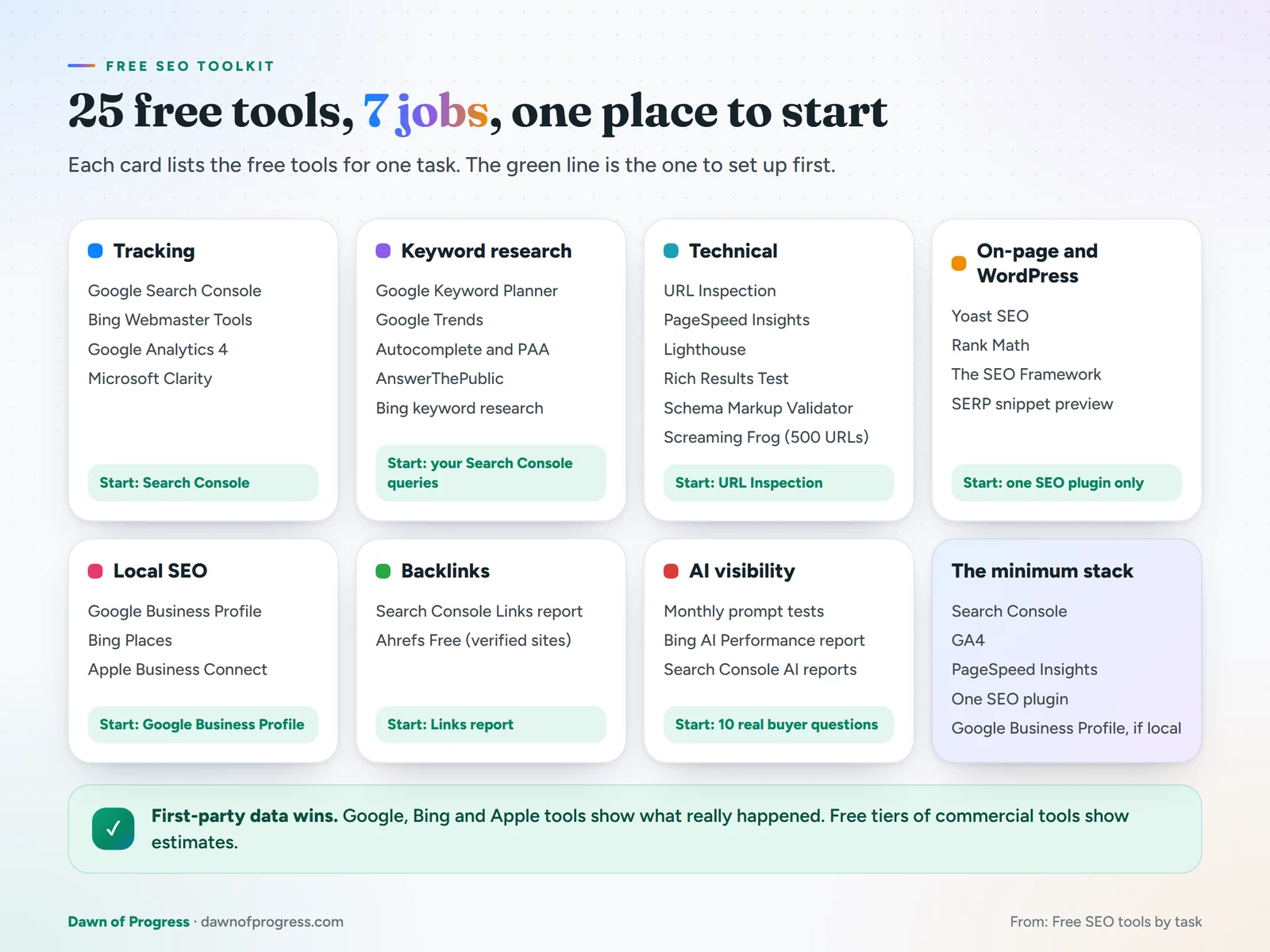
| Task | Free tools | Start with |
|---|---|---|
| Tracking and reporting | Google Search Console, Bing Webmaster Tools, GA4, Microsoft Clarity | Search Console |
| Keyword research | Keyword Planner, Google Trends, autocomplete and People Also Ask, AnswerThePublic, Bing keyword research | Search Console queries, then Keyword Planner |
| Technical SEO | PageSpeed Insights, Lighthouse, Rich Results Test, Schema Markup Validator, Screaming Frog (free), URL Inspection | URL Inspection and PageSpeed Insights |
| On-page and WordPress | Yoast SEO, Rank Math, The SEO Framework, SERP snippet preview | One SEO plugin (only one) |
| Local SEO | Google Business Profile, Bing Places, Apple Business Connect | Google Business Profile |
| Backlinks | Search Console Links report, Ahrefs Free | Search Console Links report |
| AI visibility | Bing AI Performance report, manual prompt tests | Manual prompt tests |
If you only have one hour this week, set up Search Console and GA4. Everything else builds on that data.
What are the best free tools for tracking SEO results?
Tracking tools tell you whether anything you do is working. Set these up before you change a single page, so you have a “before” to compare with.
1. Google Search Console
What it does: Shows the searches your pages appear for, impressions, clicks, average position and click-through rate, plus indexing problems, sitemaps, Core Web Vitals, links and manual actions. In 2026 it also reports impressions in Google’s AI Overviews and AI Mode. Free limit: Completely free. The Performance report keeps 16 months of data. Best for: Everyone. It is the single most useful free SEO tool. My Google Search Console guide walks through setup and the reports that matter.
2. Bing Webmaster Tools
What it does: The Bing version of Search Console: search performance, crawl and index reports, a site scan, backlinks, keyword research and URL submission. You can import your sites from Search Console instead of verifying them again. Since 2026 it also has an AI Performance report that shows when Copilot and Bing’s AI answers cite your pages. Free limit: Free. Best for: Anyone who wants Copilot visibility, and anyone with an older or B2B audience, where desktop and Bing usage is often higher.
3. Google Analytics 4 (GA4)
What it does: Tracks what visitors do after they arrive: which channel they came from, which pages they read, and whether they fill in a form or buy. Search Console tells you about the click; GA4 tells you about the visit. Free limit: The standard version is free. Best for: Measuring conversions (enquiries, sales, sign-ups) so you can judge SEO by money, not traffic. Mark your key form and checkout steps as key events on day one.
4. Microsoft Clarity
What it does: Heatmaps and session recordings. You can watch anonymised visits and see where people click, how far they scroll and where they give up. Free limit: Microsoft says Clarity is “free forever” with no traffic limits. Best for: Finding why a page that ranks well does not convert. In my client work since 2014, a few recordings have often explained a problem faster than a week of reports, for example a contact button that looked like plain text on phones.
What are the best free keyword research tools?
Keyword research means finding the words your customers type, and judging which ones are worth a page. The best free keyword source is already in your account: the Queries tab in Search Console shows the real searches you appear for. Use the tools below to expand from there. The full method is in my keyword research guide.
5. Google Keyword Planner
What it does: Suggests related keywords and gives estimated monthly searches and advertiser competition. It lives inside Google Ads. Free limit: Using it does not require running ads, but Google says you must complete account setup, including billing details. In my experience, accounts without active ad spend often see search volumes as broad ranges (for example 1K to 10K) rather than exact numbers, so treat them as rough guides. Best for: Checking whether a topic has meaningful demand and finding wording variations.
6. Google Trends
What it does: Shows how interest in a search changes over time and by region, on a 0 to 100 scale rather than absolute numbers. Free limit: Free, no account needed. Best for: Seasonal planning (publish two to three months before the peak) and comparing two phrasings, such as “SEO audit” vs “website audit”.
7. Google autocomplete and People Also Ask
What it does: Type a topic into Google and note the suggestions in the search box, the “People also ask” questions and the related searches at the bottom. These come from real search behaviour. Free limit: Free. Best for: Finding the exact questions to answer under each heading of a guide. Use a private window so your own history does not shape the suggestions.
8. AnswerThePublic
What it does: Groups autocomplete data into questions, prepositions and comparisons (“free seo tools for”, “free seo tools vs”). Free limit: A small number of free searches per day with an account; the official site does not publish the figure, so check current limits. Best for: A quick question map when starting a new topic.
9. Bing keyword research (inside Bing Webmaster Tools)
What it does: Shows keyword ideas and search counts based on Bing’s own data, with location and language filters. Free limit: Free with a Bing Webmaster Tools account. Best for: A second opinion on volumes, since Bing’s numbers are first-party data rather than third-party estimates.
What are the best free technical SEO tools?
Technical SEO makes sure search engines can reach, render and index your pages. These six tools cover most of a small site’s checks. Test your most important pages first, then work outwards.
10. URL Inspection (in Search Console)
What it does: Tells you whether Google has indexed a specific URL, which version it chose as canonical, when it last crawled it and whether it can render it. You can also request indexing after a fix. Free limit: Free; Google applies a daily quota to indexing requests. Best for: Answering “Why isn’t this page on Google?” for one URL at a time.
11. PageSpeed Insights
What it does: Combines real-user data from Chrome users (where your page has enough traffic) with a lab test, and reports Core Web Vitals: LCP, INP and CLS. Free limit: Free, no account. Best for: Checking one important page at a time, especially on mobile. Fixes usually involve images, caching and heavy scripts.
12. Lighthouse (in Chrome DevTools)
What it does: The lab engine behind PageSpeed Insights, built into Chrome. It audits performance, accessibility, best practices and basic SEO. Free limit: Free. Best for: Testing pages on a staging site or behind a login, which PageSpeed Insights cannot reach. Run it in an incognito window so browser extensions do not skew results.
13. Rich Results Test
What it does: Shows which Google rich results your structured data can produce, and flags errors. Google recommends it as the starting point for testing structured data. Free limit: Free. Best for: Checking product, review, FAQ, recipe, event and other markup that Google supports.
14. Schema Markup Validator
What it does: Validates any schema.org markup, without Google-specific rules. It is run by schema.org. Free limit: Free. Best for: Checking markup Google does not use for rich results but other systems may read, such as Organization or Person. My schema markup guide has copy-ready examples to test.
15. Screaming Frog SEO Spider (free version)
What it does: A desktop crawler that visits your site like a search engine and lists every URL with its status code, title, meta description, headings, canonical tag and more. Free limit: Free up to 500 URLs per crawl; a paid licence removes the limit and adds advanced features such as saving crawls and JavaScript rendering. Best for: Finding broken links, redirect chains, missing titles and duplicate descriptions on small sites. Use it as the “diagnose” step of an SEO audit.
What are the best free on-page and WordPress SEO tools?
On-page SEO means making each page clearly answer one search: title, headings, content, internal links and images. If your site runs on WordPress, a plugin handles the settings; the writing is still your job.
16 to 18. Yoast SEO, Rank Math and The SEO Framework (free versions)
What they do: Add title and meta description fields, XML sitemaps, canonical tags, basic schema and breadcrumbs. Yoast and Rank Math also add content checks; The SEO Framework is lighter and skips the scoring. Free limit: Each has a free version in the WordPress plugin directory and paid upgrades; check current features on each plugin’s page. Best for: Any WordPress site. Pick one and stick with it. Two SEO plugins create duplicate tags. Treat any green “SEO score” as a reminder list, not a ranking promise. My WordPress SEO guide covers the settings that matter.
19. SERP snippet preview (on this site)
What it does: Shows how your title tag and meta description may look in Google results, with length warnings, before you publish. Free limit: Free, no sign-up, on my free tools page. Best for: Writing titles that do not get cut off and descriptions that earn the click. Google may still rewrite them, so write them for the reader first.
What are the best free local SEO tools?
If you serve customers in a town or area, your business listings often bring more calls than your website. All three major listing tools are free.
20. Google Business Profile
What it does: Controls how your business appears in Google Maps and the local pack: categories, hours, services, photos, reviews, posts and performance data (calls, direction requests, website clicks). Free limit: Free. Best for: Every local business. It is usually the highest-value free SEO tool for a plumber, clinic or restaurant. The step-by-step setup is in my Google Business Profile optimization checklist.
21. Bing Places for Business
What it does: Your listing in Bing Maps and Bing local results, which also feed Microsoft’s assistants. You can import your details from Google Business Profile. Free limit: Free. Best for: A ten-minute job that adds a second map listing with matching details.
22. Apple Business Connect
What it does: Lets you claim your place card in Apple Maps and manage the logo, hours, photos and key details that iPhone users see. It now sits inside Apple’s business portal at business.apple.com. Free limit: Claiming and managing your Maps listing is free; Apple sells some separate add-ons. Best for: Businesses with many iPhone users, which in many markets is a large share of local customers.
What are the best free backlink tools?
A backlink is a link from another website to yours. Free tools will not show you a competitor’s full link profile, but they show your own links well.
23. Search Console Links report
What it does: Lists the sites that link to you, your most-linked pages, the anchor text used and your top internal links. Free limit: Free; it shows a sample of links, not every one. Best for: Seeing which pages attract links and which important pages get few internal links.
24. Ahrefs Free (formerly Ahrefs Webmaster Tools)
What it does: For sites you verify, it gives three tools: Site Audit (170+ technical and on-page checks), Site Explorer (your backlinks and the keywords you rank for) and Web Analytics. Free limit: According to Ahrefs’ own page, you get 5,000 crawl credits per project per month for Site Audit and up to 1,000 backlinks and 1,000 keywords visible at once in Site Explorer. Unverified sites, including competitors, need a paid plan. Best for: A second view of your links and a free scheduled site audit. Its traffic numbers are estimates; trust Search Console for real clicks.
How can you track AI visibility for free?
AI visibility means whether ChatGPT, Google AI Overviews, Copilot, Perplexity and Gemini mention or cite your business. Paid trackers exist, but you can start for free.
25. Manual prompt tests (plus the free AI reports)
What it does: Once a month, ask 10 to 20 real buyer questions in the free versions of ChatGPT, Gemini, Copilot and Perplexity, and in Google’s AI Mode. Note who gets named and which pages are cited. Then check the AI reports in Search Console and Bing Webmaster Tools for impressions and citations. Free limit: Free, though free AI plans have usage caps; check current limits. Best for: Spotting which competitors AI tools recommend and what facts they repeat about you. Answers vary between runs, so look at patterns over months, not one result. The strategy side is in my guide to LLM SEO.
Here is a simple log you can copy into a spreadsheet:
| Date | Question asked | Tool | Were we mentioned? | Cited page | Competitors named |
|---|---|---|---|---|---|
| 1 Dec | Best bookkeeper for small cafes in Leeds | ChatGPT | No | None | Two local firms |
| 1 Dec | Same question | Google AI Mode | Yes | /services/cafe-bookkeeping/ | One local firm |
(Example rows for illustration, not real results.)
What is the best free SEO stack for your situation?
A “stack” is the small set of tools you use together. Here is what I would set up first in each case.
| Situation | Must-have free tools | Add when ready | Skip for now |
|---|---|---|---|
| Blogger or content site | Search Console, GA4, one WordPress SEO plugin, Google Trends, autocomplete and PAA, SERP snippet preview | Screaming Frog (free), Ahrefs Free, Clarity | Local listings |
| Local business | Google Business Profile, Search Console, GA4 with call and form tracking, Bing Places, Apple Business Connect | Clarity, PageSpeed Insights, prompt tests for “best [service] in [town]” | Large keyword tools |
| E-commerce store | Search Console, GA4 with purchase tracking, Rich Results Test for product markup, PageSpeed Insights, Clarity | Screaming Frog (free) for a category or section at a time, Bing Webmaster Tools | AnswerThePublic for product pages |
Two notes on the e-commerce row. First, stores often pass the 500-URL crawl limit quickly because of filter and variant URLs, so crawl one section at a time with the free version. Second, product markup errors show up in Search Console’s Product snippets and Merchant listings reports, which is often where the quickest wins hide.
How do you use free SEO tools together each week?
Tools only help when they feed each other. This is a 60-minute weekly routine that uses nothing but free tools. It follows a simple loop: spot, diagnose, fix, confirm.
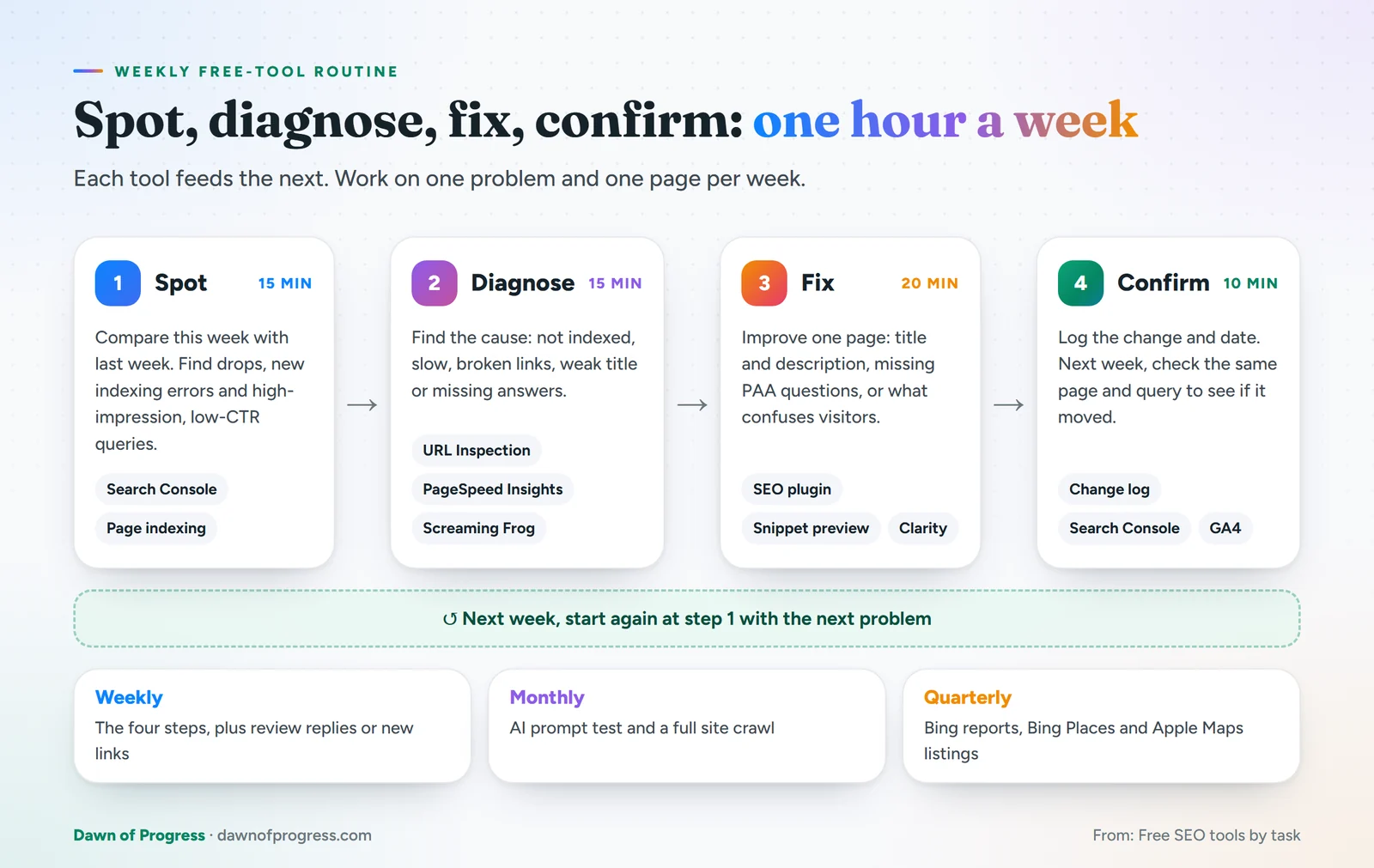
- Check Search Console Performance (10 minutes). Compare the last 7 days with the previous 7. Note any page with a big drop in clicks, and any query with many impressions but a low click-through rate.
- Check Page indexing (5 minutes). Look for new errors such as “Not found (404)” or “Crawled, currently not indexed” on pages that matter.
- Diagnose one problem (15 minutes). For a dropped page, run URL Inspection and PageSpeed Insights. For many errors, run a Screaming Frog crawl and filter by status code.
- Improve one page (15 minutes). For the low click-through query, rewrite the title and description and preview them in the SERP snippet tool. For a page ranking in positions 5 to 15, add the missing questions you found in People Also Ask.
- Check behaviour (5 minutes). Open three Clarity recordings of that page on mobile. Fix anything that confuses people.
- Check local or links (5 minutes). Local business: reply to new reviews in Google Business Profile. Everyone else: check the Search Console Links report or Ahrefs Free for new links.
- Log and confirm (5 minutes). Write down what you changed and the date. Next week, check the same page and query in Search Console to see whether it moved.
Once a month, add the AI prompt test and a full crawl. Once a quarter, check the Bing reports and your listings on Bing and Apple Maps.
When is it worth paying for SEO tools?
Free tools are enough for most single sites. Paid suites such as Semrush and Ahrefs earn their price in a few clear situations:
- You need competitor data. Free tools mostly show your own site. Seeing what a competitor ranks for, or who links to them, is the main thing you pay for.
- You manage many sites or clients. Paid tools save hours with saved projects, scheduled reports and rank tracking across many keywords.
- Your site is larger than the free limits. A shop with thousands of URLs will outgrow a 500-URL crawl quickly.
- You need daily rank tracking for specific keywords and locations, which Search Console’s averaged data does not give you.
My rule: pay when a free tool’s limit costs you more time each month than the subscription costs. Before that point, spend the money on content or on your site’s speed instead. If you are weighing AI-assisted paid tools, see AI SEO tools worth using.
What mistakes do people make with free SEO tools?
- Collecting tools instead of using them. Ten logins checked once are worth less than two checked every week.
- Trusting estimates over real data. Third-party traffic and difficulty scores are guesses. When they disagree with Search Console, Search Console wins.
- Installing two SEO plugins. You get duplicate titles, duplicate schema and two sitemaps fighting each other.
- Chasing a perfect score. A 100 in Lighthouse or a green plugin light does not mean a page will rank. Fix what affects real users first.
- Skipping Bing and Apple. They take minutes to set up and feed Copilot, Siri and Apple Maps.
- Not recording changes. Without a simple change log, you cannot tell which fix helped.
- Setting up tracking late. If GA4 and Search Console start after your redesign, you have no “before” to compare with.
Frequently asked questions
What is the best free SEO tool?
Google Search Console. It is the only free tool that shows the real searches, impressions and clicks your pages get on Google, plus indexing problems. For local businesses, Google Business Profile is just as important.
Are SEO tools free?
Many are. The tools from Google, Microsoft and Apple are free, and most commercial tools offer a free tier or free single-purpose checkers. Paid plans mainly add competitor data, larger limits and automation.
What are the best free SEO tools for beginners?
Start with Search Console, GA4, PageSpeed Insights and one WordPress SEO plugin. Add Google Business Profile if you serve a local area. Learn those well before adding anything else.
Is there a free SEO plugin for WordPress?
Yes. Yoast SEO, Rank Math and The SEO Framework all have free versions that handle titles, meta descriptions, sitemaps and basic schema. Install only one.
Can I use Ubersuggest for free?
Ubersuggest offers a limited number of free searches per day, with paid plans for more. The allowance changes, so check current limits on its site.
Can I do SEO myself with free tools?
Yes, for most small sites. The free tools here cover tracking, research, technical checks, local listings and links. What takes effort is the regular work: writing helpful pages, fixing issues and checking results every week. My SEO for small business plan shows a realistic routine.
Can ChatGPT do SEO?
It can help with tasks such as drafting titles, outlining a page or explaining a technical error, but it cannot see your rankings or your Search Console data on its own. Use it alongside the free tools above, not instead of them.
Is Ahrefs Webmaster Tools still free?
Yes. It has been renamed Ahrefs Free and still gives free Site Audit, Site Explorer and Web Analytics for sites you verify, within monthly limits.


