
Last updated: November 2026. Written by Syed Usman Riaz.
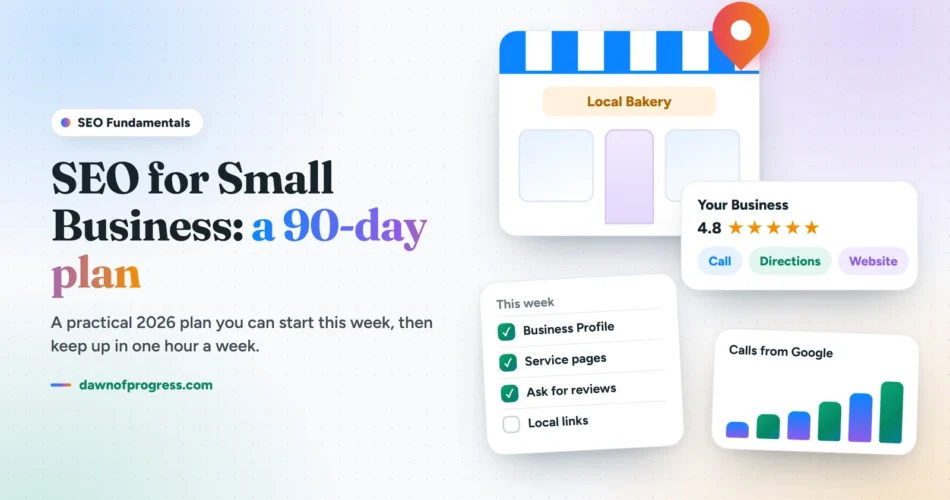
SEO for small business means making your business easy to find, understand and trust when local customers search on Google, Google Maps and AI assistants. For most small businesses the order is simple: set up a complete Google Business Profile, build one clear page per service (and per area you serve), collect real reviews, keep your name, address and phone number the same everywhere, and track results in Search Console and GA4. Google says some changes show up in hours and others take several months, so plan for 3 to 6 months of steady work before judging it, at about one hour a week once the setup is done.
This guide gives you a 30/60/90-day plan you can start this week, explains each step in plain English, and helps you decide whether to do it yourself or hire someone.
Key takeaways
- Start with Google Business Profile. For anyone who serves a local area, it is the fastest free win and often brings calls before your website ranks.
- One page per service, one page per area you truly serve. A single “Services” page can’t rank for “emergency plumber” and “boiler installation” at the same time.
- Reviews and consistent details build trust with customers, Google and AI tools at the same time.
- Answer the questions customers already ask you on the phone. Those answers are your best content, for search and for AI answers.
- Track calls, bookings and enquiries, not only rankings. Search Console, GA4 and Business Profile performance data are all free.
- Nobody can guarantee a #1 ranking. Google says so itself, so treat that promise as a red flag when hiring.
What is small business SEO?
Small business SEO is search engine optimization (improving how a website and business show up in unpaid search results) focused on the searches that bring a small business real customers. If you’re new to the term, my guide to what SEO is covers the basics.
It differs from big-brand SEO in three ways:
- It is often local. A bakery wants “birthday cakes near me” in its own town, not national traffic.
- Budgets and time are small. The owner usually does the work between jobs, so the order of tasks matters more than the number of tasks.
- Google Maps matters as much as the website. For local searches, the map listings (often called the local pack) appear above or alongside the normal results.
Local SEO for small business is the part that covers the map listing, reviews and your business details across the web. Small business SEO is the bigger picture: local SEO plus your website, content and links. Online-only businesses skip the map work and focus on the website.
Why does SEO matter for small businesses in 2026?
SEO matters because people still search before they buy, and the business that shows up with clear answers, good reviews and correct details gets the call.
Three things changed recently, and all of them favour small businesses that do the basics well:
- AI answers now sit on top of many searches. Google AI Overviews, AI Mode, ChatGPT and other assistants write an answer and cite a few sources. They are built on search indexes, so normal SEO is what makes you eligible. I explain the overlap in SEO vs GEO.
- Fewer clicks for simple questions. If someone asks “what time does a bakery open”, Google may answer from your profile without a website visit. That is still a win if they then walk in.
- Paid ads keep getting more expensive in many local trades, which makes unpaid visibility more valuable. That is a general trend, not a measured figure for every market.
SEO is slower than ads but it keeps working when you stop paying. That is why it suits a small business that plans to be around in five years.
What should you do first with limited time and budget?
Do the free, quick tasks closest to the money first. In my client work since 2014, the small businesses that got results fastest were rarely the ones with the biggest budgets. They were the ones that fixed their Google profile, built proper service pages and asked every customer for a review.
Here is the priority order I recommend:
| Priority | Task | Time (estimate) | Cost |
|---|---|---|---|
| 1 | Claim and complete your Google Business Profile | 2 to 3 hours | Free |
| 2 | Set up Google Search Console and GA4 | 1 hour | Free |
| 3 | Fix your homepage title, contact details and mobile view | 2 to 4 hours | Free to low |
| 4 | Build one page per main service | 2 to 3 hours per page | Free if you write it |
| 5 | Start asking every customer for a review | 10 minutes to set up | Free |
| 6 | Make your business details match everywhere | 2 to 4 hours | Free |
| 7 | Answer common customer questions on your site | 1 to 2 hours per article | Free |
| 8 | Earn local links and mentions | Ongoing | Free to low |
Skip, for now: paid directory bundles, buying links, rebuilding the whole website, and expensive tools. None of them beat the first five rows.
What does a 30/60/90-day small business SEO plan look like?
A 90-day plan splits the work into setup, building and growing. Each phase takes roughly 3 to 5 hours a week (an estimate for a small site with 5 to 15 pages).
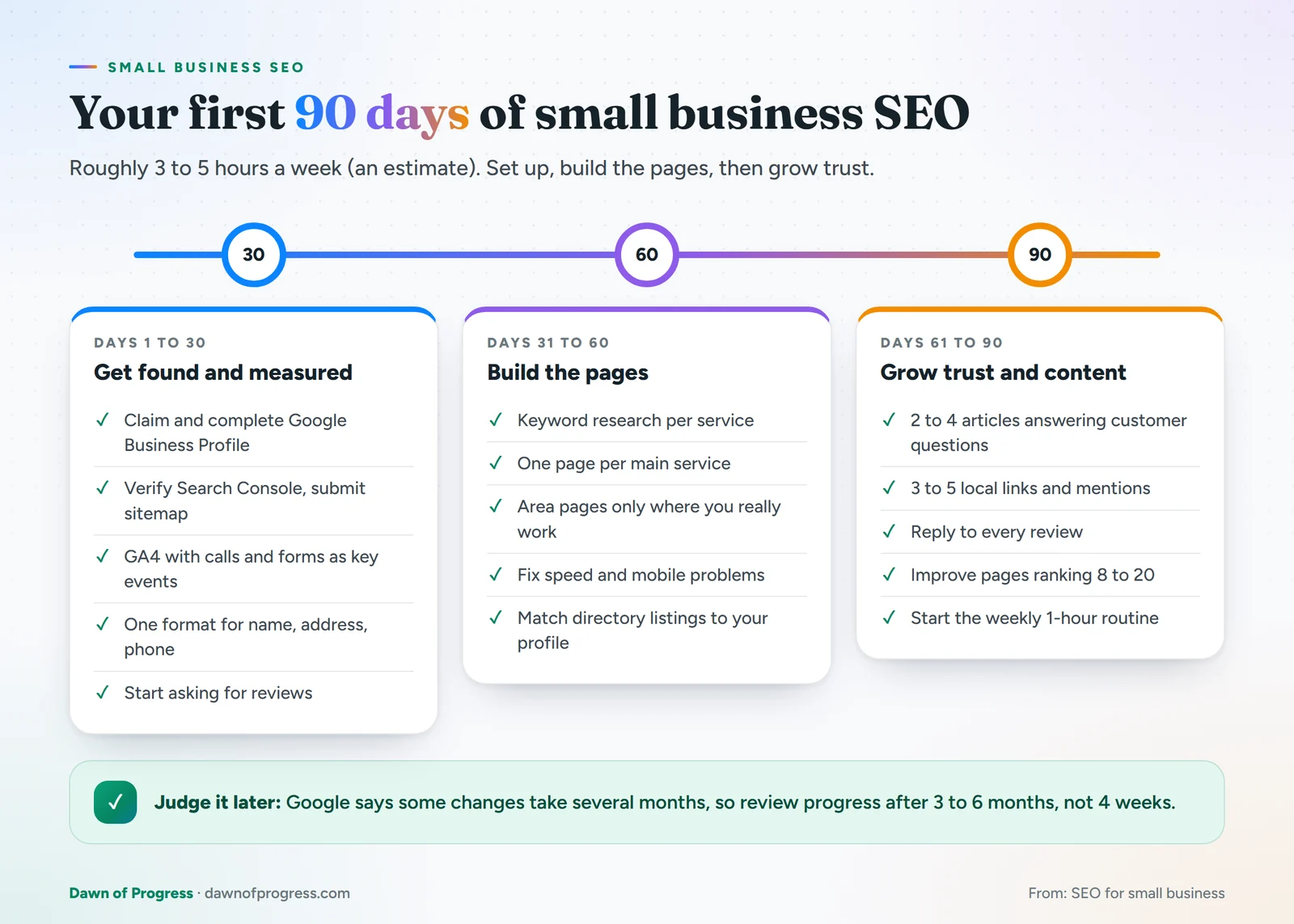
Days 1 to 30: get found and get measured
- Claim or create your Google Business Profile, verify it and fill in every field that applies.
- Verify your site in Google Search Console and submit your XML sitemap.
- Install Google Analytics 4 and mark enquiries, calls and bookings as key events.
- Write down your exact business name, address and phone number in one format.
- Check your homepage on a phone: can someone call you with one tap within 5 seconds of arriving?
- List your services and the areas you serve. This becomes your page plan.
- Create a short review link and start asking customers.
Days 31 to 60: build the pages customers need
- Do basic keyword research for each service.
- Write or rewrite one page per main service, with prices or price ranges, process, photos and FAQs.
- Add area pages only for places you genuinely serve, with local detail on each.
- Fix the biggest speed and mobile problems on those pages.
- Update your directory listings (Bing Places, Apple Business Connect, Facebook, industry directories) to match your Google profile.
Days 61 to 90: grow trust and content
- Publish 2 to 4 articles that answer real customer questions.
- Reach out for 3 to 5 local links: suppliers, associations, sponsorships, local press.
- Reply to every review and keep asking.
- Review Search Console: which queries show your pages at positions 8 to 20? Improve those pages first.
- Set up the weekly one-hour routine (later in this guide) so the work doesn’t stop on day 91.
How do you set up Google Business Profile for local SEO?
Google Business Profile is the free listing that shows your business on Google Search and Maps. If you meet customers in person, at your premises or at theirs, this is usually your biggest single lever.
Google’s own help page on improving your local ranking says local results are based mainly on relevance, distance and prominence, and that “there’s no way to request or pay for a better local ranking.” So you can’t buy your way up, but you can make your profile more relevant and more trusted:
- Primary category: choose the most specific one (“Emergency plumber” or “Cosmetic dentist” if they exist, rather than a broad one).
- Business name: use your real-world name only. Adding keywords such as “Best Bakery London” breaks Google’s guidelines and can get the profile suspended.
- Address or service area: a bakery shows its shop address; a plumber who visits homes sets a service area and can hide the address.
- Hours, services, products, attributes, description and photos: fill in everything that is true.
- Website link: point it to your homepage or the matching location page.
I cover every field, the rules and the suspension risks in my full Google Business Profile optimization guide.
How should a small business website be built for SEO?
A small business website for SEO needs to be fast, work well on a phone, and have a separate page for each thing you want to be found for. It doesn’t need to be large or expensive.
Make it fast and mobile-friendly
Most local searches happen on phones, often in a hurry. Compress images, use decent hosting, avoid heavy sliders and pop-ups, and keep the phone number tappable at the top. My website speed guide goes deeper.
One page per service, one page per area
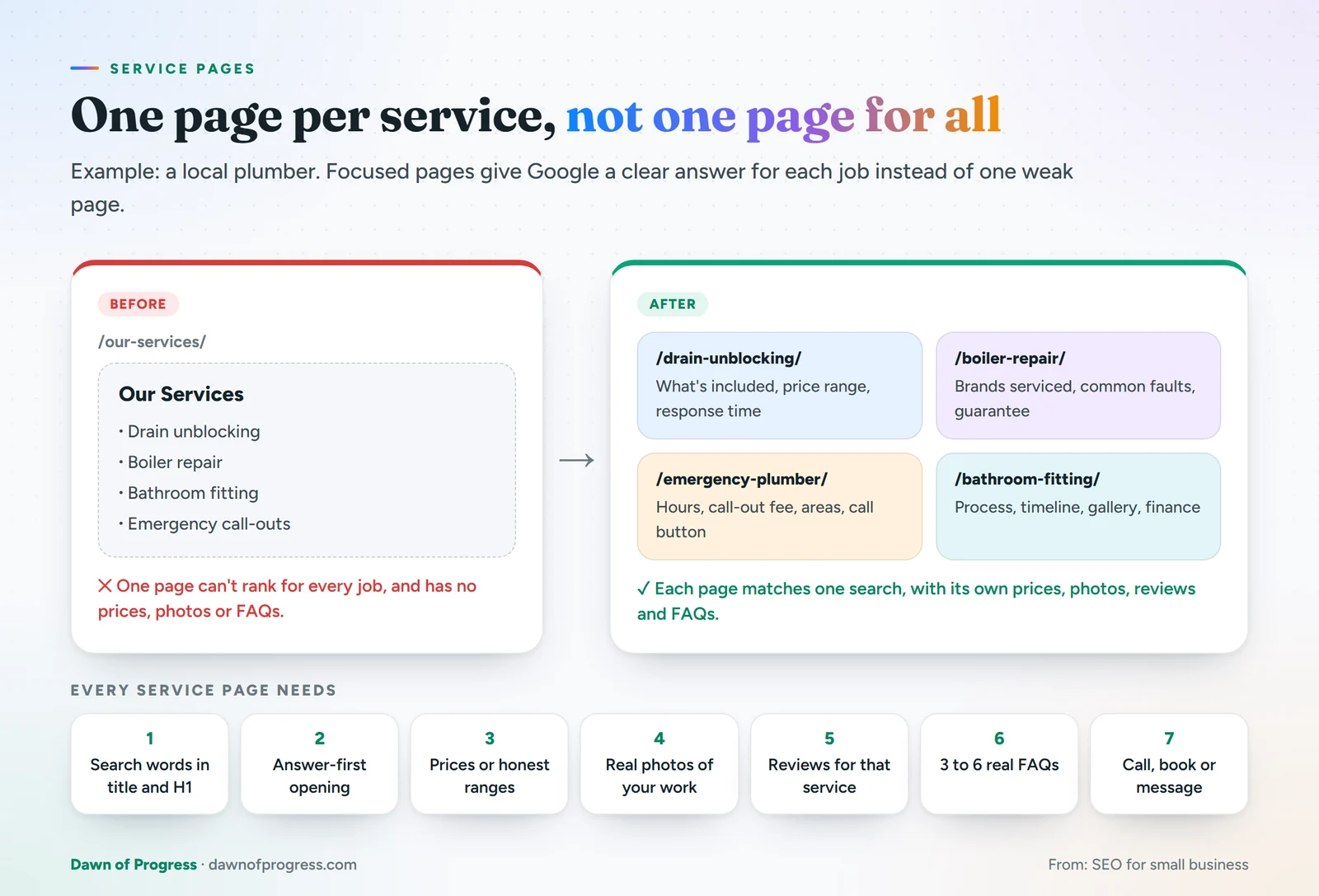
This is the most common gap on small business sites. A plumber with one “Services” page listing ten jobs gives Google one weak page. Ten focused pages give Google ten clear answers.
Before: one page called “Our Services” with a bullet list: drain unblocking, boiler repair, bathroom fitting, emergency call-outs.
After:
- /drain-unblocking/ with what’s included, typical price range, response time, photos and FAQs
- /boiler-repair/ with brands serviced, common faults, guarantee and FAQs
- /emergency-plumber/ with hours, call-out fee, areas covered and a call button
- /bathroom-fitting/ with process, timeline, gallery and finance options
Each service page should include:
- A title and H1 that use the words customers search, such as “Emergency Plumber in Leeds”.
- An answer-first opening: what you do, where, and how to book.
- Prices or honest price ranges, timelines and what’s included.
- Real photos of your work (not stock images).
- Reviews that mention that service.
- 3 to 6 FAQs taken from real customer calls.
- A clear call to action: phone, booking form or WhatsApp.
Area pages work only when they are genuinely different. A dental clinic that serves three neighbourhoods can write a page for each with directions, parking, local landmarks and patients’ common questions. Swapping the town name on 50 copies of the same page is what Google calls doorway pages, and it can hurt the whole site.
For titles, headings and internal links, follow my on-page SEO guide.
How do you find the keywords your customers use?
Find keywords by starting with the words customers use on the phone, then checking which of them people search. Owners often use trade language; customers don’t. A dentist says “prophylaxis”; patients search “teeth cleaning”.
Simple, free ways to find them:
- Your own enquiries: list the questions from the last 20 calls, emails and messages.
- Google autocomplete and People Also Ask: type your service plus your town and note what appears.
- Search Console Queries tab: once you have data, it shows the searches you already appear for.
- Business Profile search terms: your profile’s performance data lists terms people used to find you.
Group them by intent. “Wedding cake price” is a buying search for a service page; “how long does a wedding cake last” is a question for an article. My keyword research guide walks through the full process with free and paid tools.
| Business | Service page keyword | Question for an article |
|---|---|---|
| Bakery | custom birthday cakes [town] | how far ahead should I order a birthday cake? |
| Plumber | emergency plumber [town] | what to do when a pipe bursts before the plumber arrives |
| Dental clinic | teeth whitening [town] | does teeth whitening hurt? |
How do reviews help small business SEO?
Reviews help in two ways: Google says more reviews and positive ratings can help local ranking, and they persuade the people reading them. For many local searches, review count and recent comments decide who gets the call.
A simple review system:
- Get your review link from your Business Profile and turn it into a short link and a QR code.
- Ask every customer, at the moment they’re happiest: when the cake is collected, the leak is fixed, or the treatment is finished.
- Send a short follow-up message with the link the same day.
- Reply to every review, good or bad, within a few days.
Don’t offer discounts or gifts for reviews, don’t ask only happy customers (called review gating), and never write fake reviews. All of these break Google’s policies and can get reviews removed or the profile restricted.
What are NAP consistency and citations?
NAP means name, address and phone number. Citations are mentions of your business details on other websites, such as Bing Places, Apple Business Connect, Facebook, Yelp and industry directories.
When the details match everywhere, Google and AI tools can be confident they are looking at the same business, and customers don’t call an old number. Citations matter less for ranking than they did ten years ago, but wrong details still lose customers.
- Pick one format and use it everywhere (“Unit 4, 12 High Street” or “12 High Street, Unit 4”, not both).
- Claim Bing Places and Apple Business Connect; they feed other maps, assistants and car systems.
- Search your business name and any old phone number to find outdated listings.
- Add a handful of relevant directories. Ten good ones beat 200 paid ones.
What content should a small business publish?
Publish content that answers the questions customers already ask you, in the words they use. Every answered question saves you a phone call and gives Google and AI tools a passage to quote.
Good small business content ideas:
- Cost questions: “How much does a root canal cost in [city]?” with honest ranges and what changes the price.
- Comparison questions: “Sourdough vs regular bread: what’s the difference?”
- Problem questions: “Why is my boiler losing pressure?”
- Process questions: “What happens at your first dental check-up?”
Write the answer in the first one or two sentences, then explain. One useful article a month is better than four thin ones. If you use AI to help draft, read my guide to writing with AI without sounding like AI and add details only you know: your prices, your photos, your process.
How can a small business get local links and mentions?
Get local links by using the relationships you already have. A backlink is a link from another website to yours; links from relevant, real local sites count far more than links bought in bulk.
| Source | How to ask | Example |
|---|---|---|
| Suppliers and brands you use | Ask to be listed on their “where to buy” or “approved installers” page | A plumber listed as an approved installer of a boiler brand |
| Trade associations | Join and make sure your member profile links to your site | A dental clinic on its national dental association’s directory |
| Local sponsorships | Sponsor a school event, youth team or charity run that lists sponsors | A bakery supplying cakes for a school fair |
| Local press and blogs | Pitch a genuine story: an anniversary, a new hire, a community project | A local news piece about the bakery’s 25th year |
Google’s SEO Starter Guide calls word of mouth one of the most effective and lasting ways to promote a site, and warns that overdoing promotion can harm it. So skip link schemes, paid guest-post packages and private blog networks.
How do you track small business SEO results?
Track three free tools and one simple question. Rankings move every day and differ by street; enquiries are what count.
| Tool | What it tells you | Check |
|---|---|---|
| Google Search Console | Searches that show your site, clicks, positions, indexing problems | Weekly |
| Google Analytics 4 | Visits, sources and key events such as form sends and calls | Weekly |
| Business Profile performance | Views, searches, calls, direction requests and website clicks | Monthly |
| “How did you hear about us?” | Real source of every new customer | Every enquiry |
Google’s Search Console getting started guide explains the reports for site owners. Add a UTM-tagged link to your Business Profile website field so profile visits show separately in GA4 rather than mixed into ordinary Google traffic.
What good progress looks like: more impressions in Search Console first, then more clicks, then more calls and bookings. If impressions grow but clicks don’t, improve your titles and descriptions. If clicks grow but enquiries don’t, improve the page itself.
Should you do SEO yourself or hire someone?
Do the basics yourself if you have 3 to 5 hours a week for the first three months; hire help when the market is competitive, the site has technical problems, or your time is worth more serving customers.
| DIY | Freelancer | Agency | |
|---|---|---|---|
| Cost | Your time plus a few free tools | Usually hourly or monthly | Usually a monthly retainer |
| Best for | Single location, low competition, owner who likes learning | Small businesses needing setup plus a few hours a month | Multiple locations or very competitive markets |
| Risk | Slow progress, missed technical issues | Depends heavily on the person | Paying for reports instead of work |
How much does small business SEO cost?
Prices vary widely by country and competition. The most useful public data I know is Ahrefs’ poll of 439 SEO service providers (updated 2024): the most common monthly retainer was $501 to $1,000, the most common hourly rate was $75 to $100, and the most common one-off project fee was $2,501 to $5,000. Treat these as rough market ranges, not a quote. Rates outside the US and Western Europe are often lower, and very competitive industries cost more.
What to ask an SEO before hiring
Google’s page Do you need an SEO? suggests questions worth asking every time:
- Can you show examples of previous work and explain what you changed?
- Do you follow Google Search Essentials?
- What results do you expect, in what timeframe, and how will we measure them?
- What experience do you have in my industry and my area?
- Will you tell me every change you make, and why?
Red flags
- Guaranteed #1 rankings. Google states: “No one can guarantee a #1 ranking on Google.”
- A cold email saying your site has “critical errors” from someone you’ve never heard of.
- Claims of a special relationship with Google.
- Secrecy about methods, or refusal to share access and reports.
- Large numbers of links promised for a small fee.
- Asking for full owner access to your Search Console or Business Profile when read or manager access would do.
- Keeping your Google profile or domain in their account instead of yours.
If you’d prefer to hand the setup to someone who explains every step, you can work with me.
How can AI tools help a small business owner with SEO?
AI tools can save a lot of writing and planning time, but they can’t see your rankings, visit your shop or know your prices. Use them as an assistant, then check every fact.
Useful jobs for ChatGPT, Gemini, Claude or Copilot:
- Turning call notes into FAQs: paste the last 20 customer questions and ask for them grouped by topic.
- Drafting service page outlines: give it your real prices, process and area, and ask for a structure.
- Writing review replies: ask for a short, specific reply, then edit it so it sounds like you.
- Rewriting titles and meta descriptions: ask for five options under 60 and 155 characters.
Things to avoid: publishing AI pages without editing, mass-producing area pages, and trusting AI-invented statistics or “facts” about your industry. Google treats large volumes of low-value pages as spam, whoever wrote them. For tools I’ve actually tested, see practical AI tools for SEO.
You can also check your AI visibility for free: once a month, ask ChatGPT, Gemini and Google AI Mode “best [service] in [town]” and note whether you’re mentioned and how you’re described.
What does a weekly 1-hour SEO routine look like?
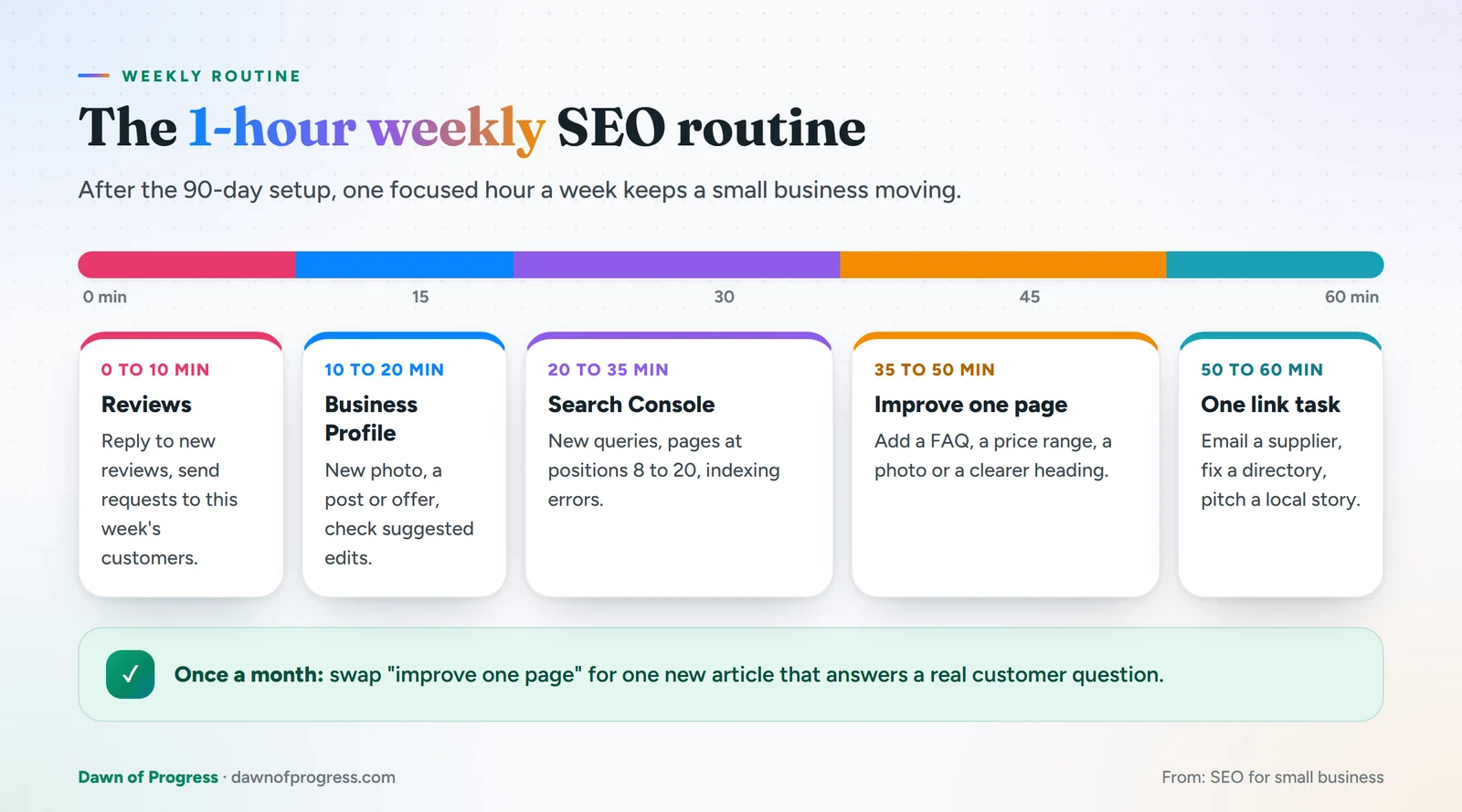
Once the 90-day setup is done, one focused hour a week keeps SEO moving. I use a similar block on my own site, and the routine is easier to keep than a big monthly push.
| Minutes | Task |
|---|---|
| 0 to 10 | Reply to new reviews and send review requests to this week’s customers |
| 10 to 20 | Check Business Profile: new photos, a post or offer, suggested edits, questions |
| 20 to 35 | Search Console: new queries, pages at positions 8 to 20, any indexing errors |
| 35 to 50 | Improve one page: add a FAQ, a price range, a photo or a clearer heading |
| 50 to 60 | One link or mention task: email a supplier, update a directory, pitch a local story |
Once a month, swap the “improve one page” block for writing one new article that answers a customer question.
What are the most common small business SEO mistakes?
- One page for all services. Google can’t rank a single page for ten different jobs.
- Keyword-stuffed business names on Google Business Profile, which risk suspension.
- Copy-paste area pages with only the town name changed.
- No way to contact you on mobile without scrolling or zooming.
- Different phone numbers on the website, the profile and directories.
- Buying links or reviews. Cheap now, expensive when it’s caught.
- Letting an agency own your accounts. Always keep your business as the primary owner.
- Judging SEO after four weeks. Most changes need months, not days.
Frequently asked questions
Is SEO worth it for a small business?
Yes, for most businesses whose customers search before buying. The basics (Business Profile, service pages, reviews) are free and keep working without paying per click.
How long does SEO take for a small business?
Google says some changes take effect in hours and others take several months. Business Profile improvements often show within weeks; website rankings for competitive services usually take 3 to 6 months or more.
Can I do SEO for my small business myself?
Yes. Most of the first 90 days is setup work an owner can do with free tools. Get help for technical fixes, very competitive markets, or when your time is better spent with customers.
What is the 80/20 rule for SEO?
It means about 20% of the work brings about 80% of the results. For a local business, that 20% is usually Google Business Profile, service pages, reviews and fixing mobile problems. It’s a rule of thumb, not a measured law.
Is SEO being replaced by AI?
No. AI answers in Google, ChatGPT and Copilot rely on search indexes and trusted sources, so SEO is how you become one of those sources. The habits that help most are clear answers, consistent business details and real reviews.
What are the four types of SEO?
Usually listed as on-page SEO (content and pages), technical SEO (speed, crawling, indexing), off-page SEO (links, mentions, reviews) and local SEO (map listings and local signals). A small business needs a little of all four.


