
Last updated: November 2026. Written by Syed Usman Riaz.
An SEO audit is a structured check of how well search engines can find, understand and trust your website, ending in a prioritized list of fixes. Work in this order: goals and baseline data, indexing and crawl, technical health, on-page, content quality and cannibalization, internal links, page experience, backlinks, local search if relevant, and AI search visibility. Google Search Console, PageSpeed Insights, the Rich Results Test, Bing Webmaster Tools and the free version of Screaming Frog (up to 500 URLs) cover almost everything a small site needs, and a full audit of a 50-page site takes about one working day.
Below: what to check at each step, which free tool to use, how to rank what you find, and a report template. Short on time? Skip to the 60-minute mini audit.
Key takeaways
- Start with goals and numbers, not a crawler. Write down which pages make money and what they get from search today, so you know what “better” means.
- Audit in order. A page that isn’t indexed can’t benefit from a better title, so fix crawl and indexing problems before on-page polish.
- Free tools are enough for most small sites. Search Console shows what Google did; a crawler shows what your site serves.
- Score every finding by impact and effort. A 200-row list nobody acts on is worse than 10 ranked fixes with an owner and a date.
- Check AI search too. In 2026 Google and Bing both report how often your pages appear in their AI answers.
What is an SEO audit?
An SEO audit is a review of everything that affects how your site performs in search: whether pages can be crawled and indexed, whether they load well, whether each one clearly answers a search, whether the site is trusted by other sites, and whether it is cited in AI answers. The output is not a score. It is a short list of problems, their likely effect on traffic and sales, and the order to fix them.
A few terms you will meet:
- Crawling: a search engine bot (Googlebot, Bingbot) fetching your pages.
- Indexing: the search engine storing a page so it can appear in results.
- Cannibalization: two or more of your own pages competing for the same search, so neither ranks as well as one strong page would.
- Core Web Vitals: Google’s three page experience metrics for loading, responsiveness and visual stability.
A “website audit” is usually wider, adding design, accessibility, security and conversion rate. An SEO audit stays focused on search visibility.
When should you run an SEO audit?
Run a full audit when something changes or something breaks:
- Before or after a redesign, migration or platform change (new theme, new CMS, new domain, http to https). This is where most traffic losses I have seen in client work since 2014 started.
- When organic clicks drop for more than a few weeks and it is not a seasonal pattern.
- When you take over a site as a new owner, freelancer or agency.
- Before investing in content or links, and on a regular schedule (see below).
How do you do an SEO audit, step by step?
Follow the ten steps in order. Each step answers one question, and each has a free tool that answers it.
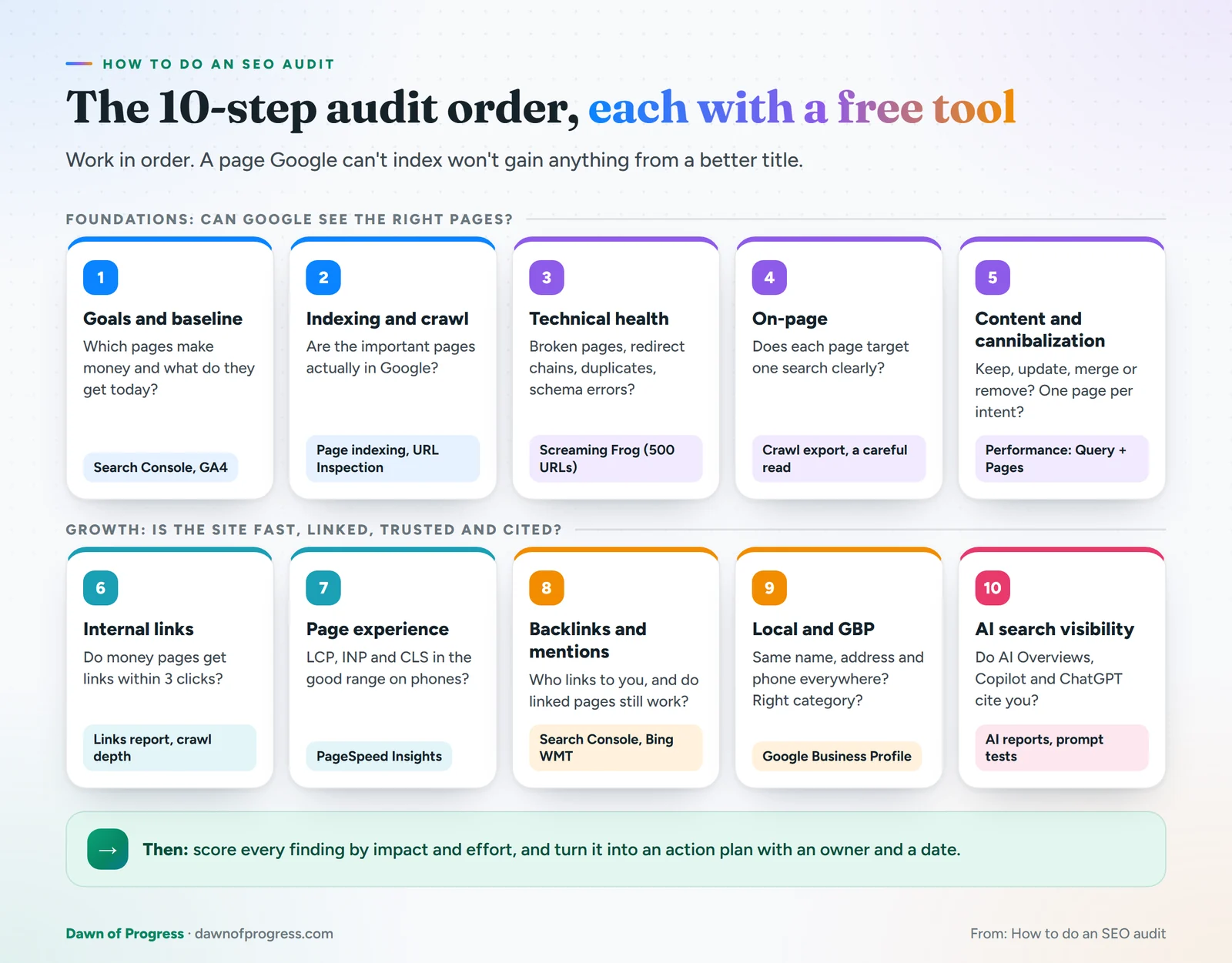
| Step | Question it answers | Main free tool |
|---|---|---|
| 1. Goals and baseline | What matters and where are we now? | Search Console, GA4 |
| 2. Indexing and crawl | Can Google find and index the right pages? | Search Console Page indexing, URL Inspection, site: search |
| 3. Technical health | Does the site return clean, consistent pages? | Screaming Frog (free, 500 URLs), Bing Site Scan |
| 4. On-page | Does each page target one search clearly? | Screaming Frog, your browser |
| 5. Content quality and cannibalization | Is the content worth ranking, with one page per intent? | Search Console Performance |
| 6. Internal links | Do important pages get enough links? | Search Console Links, Screaming Frog |
| 7. Page experience | Is the site fast and stable on phones? | PageSpeed Insights, Core Web Vitals report |
| 8. Backlinks and mentions | Do other sites trust and mention you? | Search Console Links, Bing Webmaster Tools |
| 9. Local and GBP | Do you show up in local results and Maps? | Google Business Profile, Search Console |
| 10. AI search visibility | Are you cited in AI answers? | Search Console AI report, Bing AI Performance, manual prompts |
Step 1: Set goals and record baseline data
Before you open any tool, write down what the site is for: leads, sales, bookings or readers. Then list the 5 to 20 pages that bring that result (service pages, top products, best articles).
Record a baseline from the last 3 months and the same 3 months a year earlier, so seasons don’t fool you:
- In Search Console, open Performance (Search results) and note total clicks, impressions, average CTR and average position. The report keeps up to 16 months of data.
- Switch to the Pages tab and export the top landing pages.
- In GA4, note organic sessions and conversions (form fills, calls, purchases) for the same dates.
- Save everything in one sheet with today’s date. Every later change is measured against this.
If you haven’t set up Search Console yet, follow my Google Search Console guide first. You can’t audit what you can’t see.
Step 2: Check indexing and crawl
This step answers the most important question: are the pages you care about actually in Google?
- Open Indexing > Pages in Search Console. Look at the reasons under “Why pages aren’t indexed” and ask whether any important page is listed. Many “not indexed” URLs (redirects, deliberate noindex pages, old 404s) are normal.
- Check Indexing > Sitemaps. The sitemap should be submitted, read successfully and list only final, indexable URLs.
- Run URL Inspection on your homepage and your top 3 money pages. Confirm “URL is on Google”, the canonical Google selected matches yours, and Test live URL shows the full page.
- Open
yourdomain.com/robots.txtand look for rules that block real content, such asDisallow: /. - Do a quick
site:yourdomain.comsearch to spot obvious problems: old staging pages, spam pages you didn’t create, or a strange page count. Don’t treat the number as exact. Google says the site: operator doesn’t necessarily return all indexed URLs.
On WordPress, also check that “Discourage search engines from indexing this site” under Settings > Reading is unticked. I still find that box ticked on live sites more often than you would expect.
Step 3: Check technical health
Now crawl the site to see what it serves. Download the free version of Screaming Frog SEO Spider, which crawls up to 500 URLs per crawl, enough for most small business sites. Enter your homepage and let it run. Then check:
- Response codes: 4xx (broken) and 5xx (server error) pages, and internal links pointing to them.
- Redirects: chains (A to B to C) and loops. Every internal link should point to the final URL.
- Indexability: pages marked “Non-Indexable” that you want in Google, usually because of a noindex tag or a canonical pointing elsewhere.
- Duplicate URLs: http and https, www and non-www, trailing slash and no slash, all resolving to one version.
- Structured data: test your main templates in Google’s Rich Results Test to see errors and which rich results each page is eligible for.
Over 500 URLs? Bing Webmaster Tools has a free Site Scan that crawls your site and lists errors and warnings.
I won’t repeat every technical check here. For the full list of 25 checks with fixes, use my technical SEO checklist as the companion to this step.
Step 4: Review on-page SEO
On-page SEO is how each page tells people and search engines what it is about. Export the Screaming Frog tabs for Page Titles, Meta Description and H1, then filter for:
- Missing, duplicate or very long titles (aim for roughly 50 to 60 characters, main topic near the start).
- Missing or duplicate meta descriptions.
- Missing or multiple H1s.
- Images without alt text (the Images tab).
Then read your 10 most important pages like a customer. Does the title match what people search, does the first paragraph answer it, and is there a clear next step? My on-page SEO guide explains each element in detail.
Here is a typical before and after for a service page:
| Element | Before | After |
|---|---|---|
| Title | Home – Services – Smith & Co | Bookkeeping for Small Businesses in Leeds – Smith & Co |
| H1 | Welcome | Bookkeeping Services for Leeds Small Businesses |
| First paragraph | We are a passionate team founded in 2009… | We handle bookkeeping, VAT returns and payroll for Leeds businesses with 1 to 50 staff, from a fixed monthly fee. |
Step 5: Check content quality and cannibalization
Content quality is the hardest step to automate and matters most. Use Google’s own helpful content self-assessment questions as your checklist: does the page offer original information or experience, is the author clear, and would a reader leave satisfied without searching again?
Sort your pages into four groups:
- Keep: pages that get clicks and convert. Leave them alone or make small updates.
- Update: pages with impressions but few clicks, or rankings in positions 5 to 20. These are your fastest wins.
- Merge: thin or overlapping pages on the same topic. Combine them into one strong page and 301-redirect the others.
- Remove or noindex: pages with no traffic, no links and no purpose, such as old event pages or empty tag archives.
To find cannibalization, go to Performance in Search Console, add a Query filter for an important search term, then open the Pages tab. If two or more of your URLs share impressions for the same query, they may be competing. Decide which page should own that search, then merge, re-angle or link the others to it. Not every overlap is a problem: a service page and a blog post can rank for the same term if they serve different intents. Proper keyword research before writing prevents most of this.
Also check trust signals: author names, an about page, contact details and real experience. See what E-E-A-T is.
Step 6: Audit internal links
Internal links tell Google which pages matter and help it discover new ones. Check:
- Top linked pages in Search Console’s Links report (internal links section). Your money pages should be near the top, not your privacy policy.
- Crawl depth in Screaming Frog. Important pages should be reachable within 3 clicks of the homepage.
- Orphan pages: pages in your sitemap or analytics that no other page links to.
- Anchor text: links that say “click here” or “read more” instead of describing the target page.
The usual fix: add 2 to 5 contextual links from related, well-performing pages to each important page.
Step 7: Check page experience and Core Web Vitals
Open Search Console’s Core Web Vitals report for site-wide URL groups, then test your top templates (homepage, a service page, a blog post, a product page) in PageSpeed Insights on mobile.
Look at the field data first. That is real Chrome user data from the last 28 days, and it is what Google uses. The “good” thresholds, from web.dev, are:
| Metric | What it measures | Good |
|---|---|---|
| LCP (Largest Contentful Paint) | How fast the main content appears | 2.5 seconds or less |
| INP (Interaction to Next Paint) | How fast the page responds to taps and clicks | 200 ms or less |
| CLS (Cumulative Layout Shift) | How much the layout jumps while loading | 0.1 or less |
Small sites often have no field data; then use the lab score as a guide, but don’t chase a perfect 100. Also open the page on a real phone, since Google retired its Mobile-Friendly Test in December 2023. Pop-ups covering content and tiny tap targets lose visitors whatever the scores say. Fixes are in my website speed guide.
Step 8: Review backlinks and mentions
Backlinks are links from other websites to yours. You don’t need a paid tool to start:
- Search Console > Links > External links shows your top linking sites and the pages they link to.
- Bing Webmaster Tools > Backlinks shows a second, independent list, and lets you compare with competitors.
Look for three things: which pages earn links (never delete or move them without a redirect), broken pages that still receive links (redirect them to the closest live page), and unlinked brand mentions (search your business name in quotes, excluding your own site).
Ignore “toxic” scores from third-party tools. Google ignores most spammy links on its own and says most sites don’t need the disavow tool. Use it only after a manual action for unnatural links, or if you know someone bought links for you.
Step 9: Check local SEO and your Google Business Profile (if relevant)
If you serve customers in a specific area, check your Google Business Profile:
- Is the business name, address and phone number the same as on your website and main directories?
- Is the primary category the most specific one that fits?
- Are hours, services and photos current, and are reviews answered?
- Does the website link go to the right page (often a location page, not always the homepage)?
Then search your main service plus your city on a phone and note your map position. My Google Business Profile optimization guide walks through every section.
Step 10: Check AI search visibility
AI Overviews, AI Mode, ChatGPT, Copilot and Perplexity all draw on search indexes, so steps 2 to 8 do most of the work. Then measure:
- Search Console’s generative AI performance report, which Google announced in June 2026. It shows how often your pages appeared in AI Overviews and AI Mode, as impressions by page, country, device and date.
- Bing Webmaster Tools’ AI Performance report, in public preview since February 2026. It shows citations, cited pages and the grounding queries Copilot and Bing used.
- Referral traffic in GA4 from sources such as chatgpt.com, perplexity.ai and copilot.microsoft.com.
- A manual prompt test: ask 10 real buyer questions in ChatGPT, Gemini, Copilot, Perplexity and Google AI Mode, and note whether you, or a competitor, is named.
Make sure robots.txt doesn’t block AI search crawlers such as OAI-SearchBot if you want to appear in ChatGPT search. The difference between ranking and being cited is covered in SEO vs GEO.
Which free SEO audit tools should you use?
The free toolkit at a glance:
| Tool | Best for | Free limit |
|---|---|---|
| Google Search Console | Baseline, indexing, sitemaps, internal and external links, Core Web Vitals, AI impressions | Verified sites only |
| URL Inspection (inside Search Console) | Is one URL indexed, which canonical, rendered page | One URL at a time, daily quota for indexing requests |
| PageSpeed Insights | Core Web Vitals field data and a lab test for one page | One URL at a time |
| Rich Results Test | Structured data errors and rich result eligibility | One URL or code snippet at a time |
| Screaming Frog SEO Spider | Status codes, redirects, titles, H1s, canonicals, crawl depth | 500 URLs per crawl, no saved crawls or advanced settings |
| Bing Webmaster Tools | Site Scan, backlinks, Bing and Copilot data, AI Performance | Verified sites only |
| A site: search | Quick check for odd, old or spam pages in Google | Results are a sample, not a full count |
Paid suites such as Semrush and Ahrefs add rank tracking, competitor data and larger crawls, but their traffic numbers are estimates, not Google’s data. I list the tools I use on my tools page.
How do you prioritize SEO audit findings?
Give every finding two scores from 1 to 3: impact (how much it affects traffic or sales) and effort (how much time or money it takes). Then work in this order:
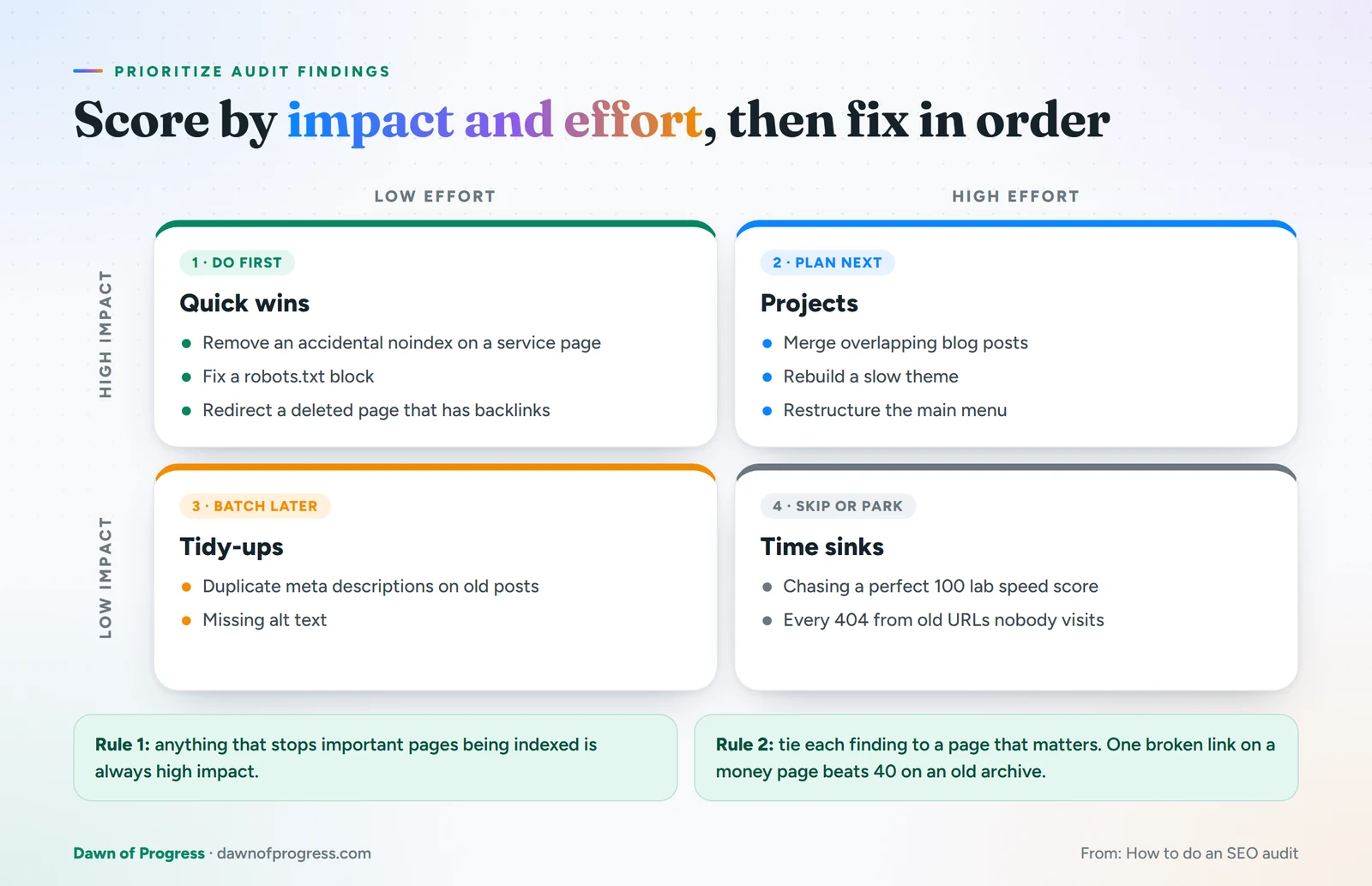
| Low effort | High effort | |
|---|---|---|
| High impact | Do first. Example: remove an accidental noindex on a service page; fix a robots.txt block; redirect a deleted page that has backlinks | Plan next. Example: merge 6 overlapping blog posts; rebuild a slow theme; restructure the main menu |
| Low impact | Batch later. Example: rewrite duplicate meta descriptions on old posts; add missing alt text | Skip or park. Example: chase a perfect 100 lab speed score; fix every 404 from old URLs nobody visits |
Two rules keep this honest. Anything that stops important pages being indexed is always high impact. And tie each finding to a page that matters: one broken link on your top service page beats 40 on a 2017 news archive. This is the practical version of the 80/20 rule: a small number of fixes on a small number of pages usually drives most of the result.
How do you write the SEO audit report and action plan?
A good report is short enough to read in 10 minutes. Use this structure:
- Summary (half a page): the 3 to 5 biggest findings in plain English and what fixing them should change.
- Baseline: the numbers from step 1.
- Action plan table: every finding in priority order.
- Appendix: exports, screenshots and URL lists.
Use this template for the action plan:
| # | Finding | Evidence | Affected pages | Impact (1-3) | Effort (1-3) | Fix | Owner | Due | Status |
|---|---|---|---|---|---|---|---|---|---|
| 1 | Service page set to noindex | URL Inspection: “Excluded by noindex tag” | /bookkeeping-leeds/ | 3 | 1 | Untick noindex in SEO plugin, request indexing | Developer | This week | Open |
| 2 | Two posts compete for “vat return deadline” | Search Console: both URLs get impressions for the query | 2 blog posts | 2 | 2 | Merge into one guide, 301 the other | Writer | 2 weeks | Open |
| 3 | Slow LCP on mobile service pages | PageSpeed Insights field data: LCP above 4 s | Service template | 3 | 3 | Compress hero image, remove slider, add caching | Developer | Next month | Open |
| 4 | 38 missing meta descriptions | Screaming Frog export | Old blog posts | 1 | 1 | Write descriptions for posts with impressions first | Writer | Next month | Open |
The rows are illustrations, not a real client. Write each “Fix” so someone who wasn’t in the audit can do it. Then book a date, roughly 4 to 8 weeks after the fixes go live (an estimate; larger sites take longer to recrawl), to compare against the baseline.
How do you do a 60-minute mini SEO audit?
For a small site (under about 50 pages), this finds the problems that matter most:
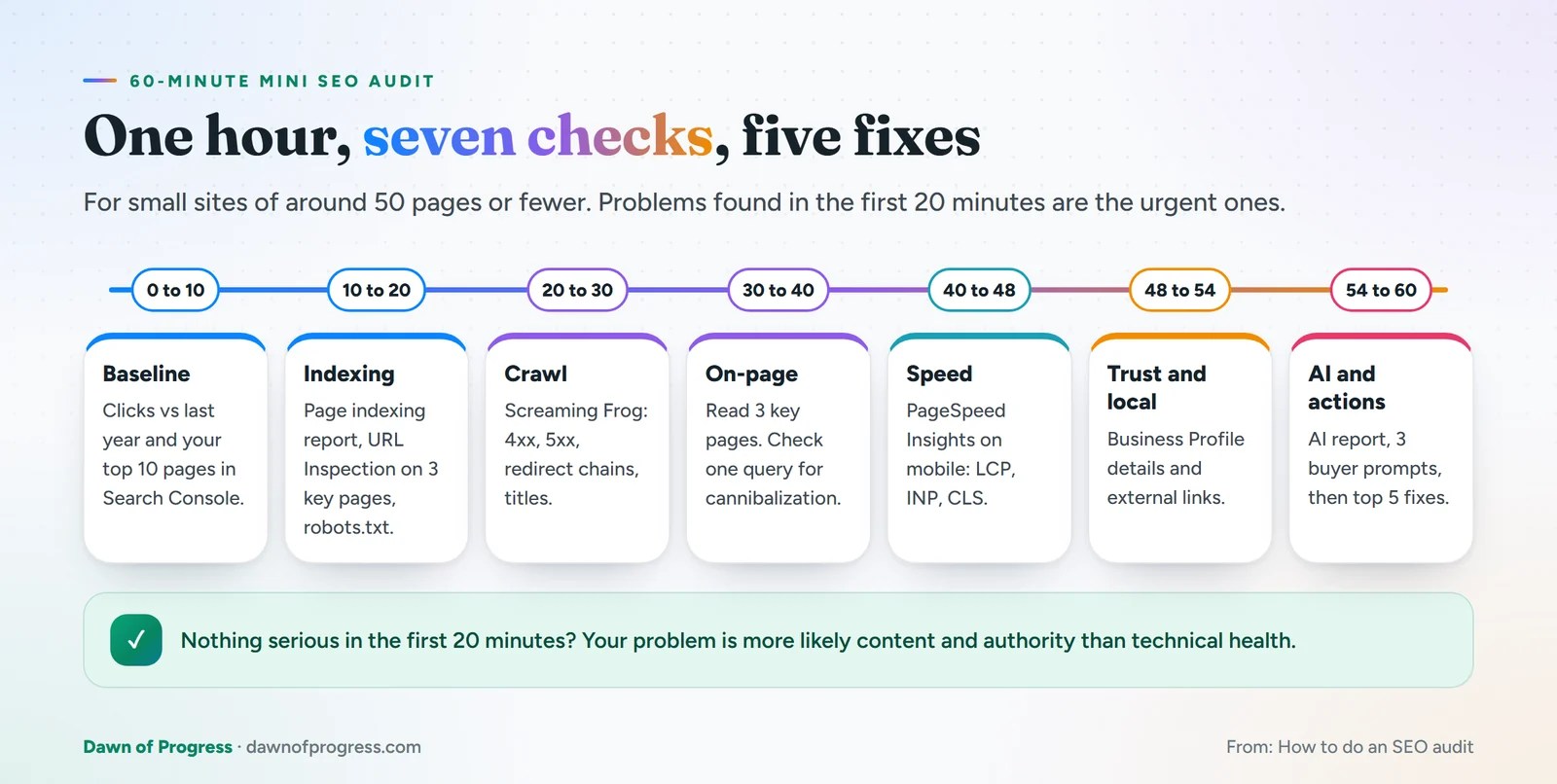
- Minutes 0 to 10, baseline: In Search Console Performance, compare the last 3 months with the previous year. Note clicks and your top 10 pages.
- Minutes 10 to 20, indexing: Check Indexing > Pages for important URLs that aren’t indexed. Run URL Inspection on the homepage and your top 2 money pages. Open robots.txt.
- Minutes 20 to 30, crawl: Run Screaming Frog. Note 4xx and 5xx pages, redirect chains, non-indexable pages and duplicate or missing titles.
- Minutes 30 to 40, on-page and content: Read your 3 most important pages. Does each title and first paragraph clearly answer one search? Check one key query for cannibalization.
- Minutes 40 to 48, speed: Test the homepage and one service page in PageSpeed Insights on mobile. Note LCP, INP and CLS.
- Minutes 48 to 54, trust and local: Check your Google Business Profile details and the external links in Search Console’s Links report.
- Minutes 54 to 60, AI and action list: Check the generative AI report, ask 3 buyer questions in an AI assistant, then write your top 5 fixes with impact and effort scores.
Nothing serious in the first 20 minutes? Your problem is more likely content and authority than technical health.
How often should you do an SEO audit?
| Site type | Full audit | Light monthly check |
|---|---|---|
| Small business or brochure site | Once a year | 15 minutes in Search Console |
| Blog or content site publishing weekly | Every 6 months | Indexing, top pages, cannibalization |
| Online store or large site | Every 3 to 6 months | Indexing, crawl errors, Core Web Vitals |
| Any site after a redesign or migration | Immediately, then again after 4 to 6 weeks | Daily for the first 2 weeks |
These are my working recommendations, not a Google rule. The monthly check catches problems before they cost months of traffic. If you run a local business, my guide to SEO for small business shows how audits fit into a simple monthly routine.
What are the most common SEO audit mistakes?
- Starting with a tool’s score. “Site health 74%” tells you nothing about sales. Start with goals and baseline data.
- Auditing out of order. Polishing titles on pages Google hasn’t indexed wastes time.
- Treating every warning as a problem. Crawlers flag many things that don’t matter, such as “low word count” on a contact page.
- Trusting the site: count. It’s a sample. Use the Page indexing report instead.
- Disavowing links because a third-party tool said “toxic”. Without a manual action, this usually does nothing useful and can remove links that help.
- Writing a 100-page report. If nobody acts on it, the audit failed. Prioritize and assign owners.
- Not measuring afterwards. Without a before and after, you can’t tell which fixes worked.
Frequently asked questions
What is an SEO audit checklist?
It’s a list of everything to check in an audit, grouped by area: indexing, technical health, on-page, content, internal links, page experience, backlinks, local and AI visibility. The ten steps in this guide work as a checklist; for the technical part, use the technical SEO checklist.
How long does an SEO audit take?
A 60-minute mini audit covers the basics for a small site. A full audit of a 50-page site takes about a day, and a large store or publisher can take one to several weeks. These are estimates; site size, complexity and access to data change them.
What are SEO audit services?
They are audits done for you by a freelancer or agency, usually delivered as a report and action plan. Before you hire, ask for a sample report and check that it prioritizes fixes and is based on your Search Console data, not only an automated tool export.
What is the 80/20 rule in SEO?
It’s the idea that a small share of pages and fixes produces most of the results. In an audit, it means focusing on the pages that bring leads or sales and the issues that block them, before cleaning up everything else.
Can AI do an SEO audit?
AI tools can speed up parts of it: summarizing crawl exports, drafting titles and grouping findings. They can’t see your Search Console data unless you give it to them, and they often flag problems that don’t matter, so check every recommendation yourself.


