
Last updated: November 2026. Written by Syed Usman Riaz.
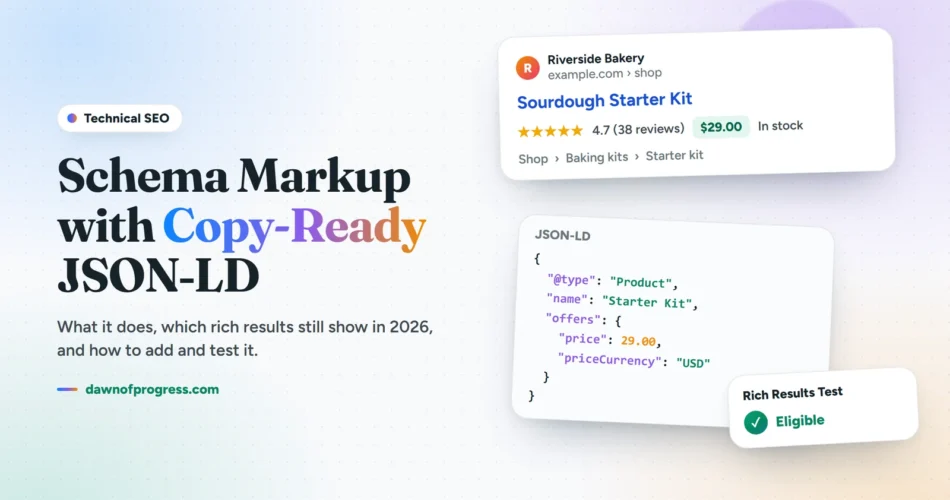
Schema markup is code that describes your page to search engines in a shared vocabulary from schema.org, for example “this is a product, it costs $49 and it’s in stock”. Google recommends adding it as JSON-LD, a small script block that sits apart from your visible content. Schema markup doesn’t directly boost rankings, but it can make a page eligible for rich results such as product prices, review stars, recipe cards and event dates, which can earn more clicks. In 2026 the types worth adding for most sites are Organization or LocalBusiness, Article, Product, BreadcrumbList and, where relevant, Event, VideoObject and Recipe.
Below: what schema markup is, which rich results Google still supports after the recent clean-outs, five JSON-LD examples to copy, and how to add and test them.
Key takeaways
- Schema markup describes, it doesn’t rank. It helps Google understand a page and can make it eligible for rich results, but Google doesn’t guarantee they’ll show.
- Use JSON-LD. Google supports JSON-LD, Microdata and RDFa equally, and recommends JSON-LD because it’s easiest to add and maintain.
- Google has retired many rich results. HowTo rich results stopped in 2023 and FAQ rich results stopped appearing in May 2026. Check the search gallery before you build anything.
- Only mark up what visitors can see. Hidden content, fake reviews and misleading markup can cost you rich results through a manual action.
- Test every template in the Rich Results Test, then watch Search Console’s Enhancements and Shopping reports.
- No special schema is needed for AI search. Google says so directly. Structured data still helps machines read your facts, so add it for rich results and clarity, not as an AI trick.
What is schema markup?
Schema markup is a set of labels you add to a web page’s code so machines know what each piece of information means. A human sees “Riverside Bakery, 12 Mill Road, open 8:00 to 18:00”. A search engine sees plain text until you label the name, the address and the hours.
Three terms get mixed up, so here is how they fit together:
- Structured data is any information organized in a standard format so a machine can read it. Google’s documentation uses this term.
- Schema.org is the shared vocabulary: a free dictionary of types (such as
Product,Event,Person) and their properties (such asprice,startDate,jobTitle). It was started in 2011 by Google, Microsoft and Yahoo, with Yandex joining soon after, and it is now developed in the open through a W3C community group. - Schema markup is the code on your page that uses that vocabulary. In practice, SEOs say “schema”, “schema markup” and “structured data” to mean the same thing.
The vocabulary is widely used. Schema.org’s own home page says that as of 2024, more than 45 million web domains used its markup.
JSON-LD vs Microdata vs RDFa
You can write schema markup in three formats. All three use the same schema.org vocabulary; they differ in where the code lives.
| Format | Where the code lives | Downside | Use it when |
|---|---|---|---|
| JSON-LD | One <script type="application/ld+json"> block in the head or body | Must be kept in sync with visible content | Almost always. Google recommends it. |
| Microdata | Attributes (itemscope, itemprop) on visible HTML elements | Clutters templates, breaks in redesigns | An older theme already uses it |
| RDFa | Attributes (vocab, typeof, property) on visible HTML elements | Same clutter as Microdata | Your CMS already outputs it |
Google’s introduction to structured data says all three formats are fine when implemented correctly, and recommends JSON-LD because it’s the easiest to implement and maintain. Every example here uses it.
Does schema markup help SEO?
Yes, but not the way many people think. Schema markup is not a ranking factor that lifts a page by itself. Its job is to remove doubt about what a page is and to make the page eligible for special search features.
| What schema markup does | What it doesn’t do |
|---|---|
| Makes pages eligible for rich results such as prices, stars, recipe cards, event dates and video thumbnails | It doesn’t guarantee a rich result, even when the code is valid |
| Helps Google connect your page to entities (your business, your author, your product) | It doesn’t directly raise rankings |
| Can feed details into knowledge panels, Google Images and other features | It doesn’t fix thin content, slow pages or indexing problems |
| Can raise click-through rate when a rich result does appear | It doesn’t bring back FAQ or HowTo rich results |
Google’s general structured data guidelines say it doesn’t guarantee your structured data will show, even when the page passes testing.
When rich results do show, the effect can be large. Case studies Google publishes include Rotten Tomatoes (25% higher click-through rate on pages with structured data) and Nestlé (82% higher click-through rate on rich result pages). Those are big brands, not a forecast for your site.
In my client work since 2014, the honest pattern is this: schema rarely moves a page from page three to page one, but on product, recipe and event pages that already rank, it often decides whether the listing looks plain or catches the eye.
New to search in general? Start with what is SEO and my on-page SEO guide.
Which rich results does Google still support in 2026?
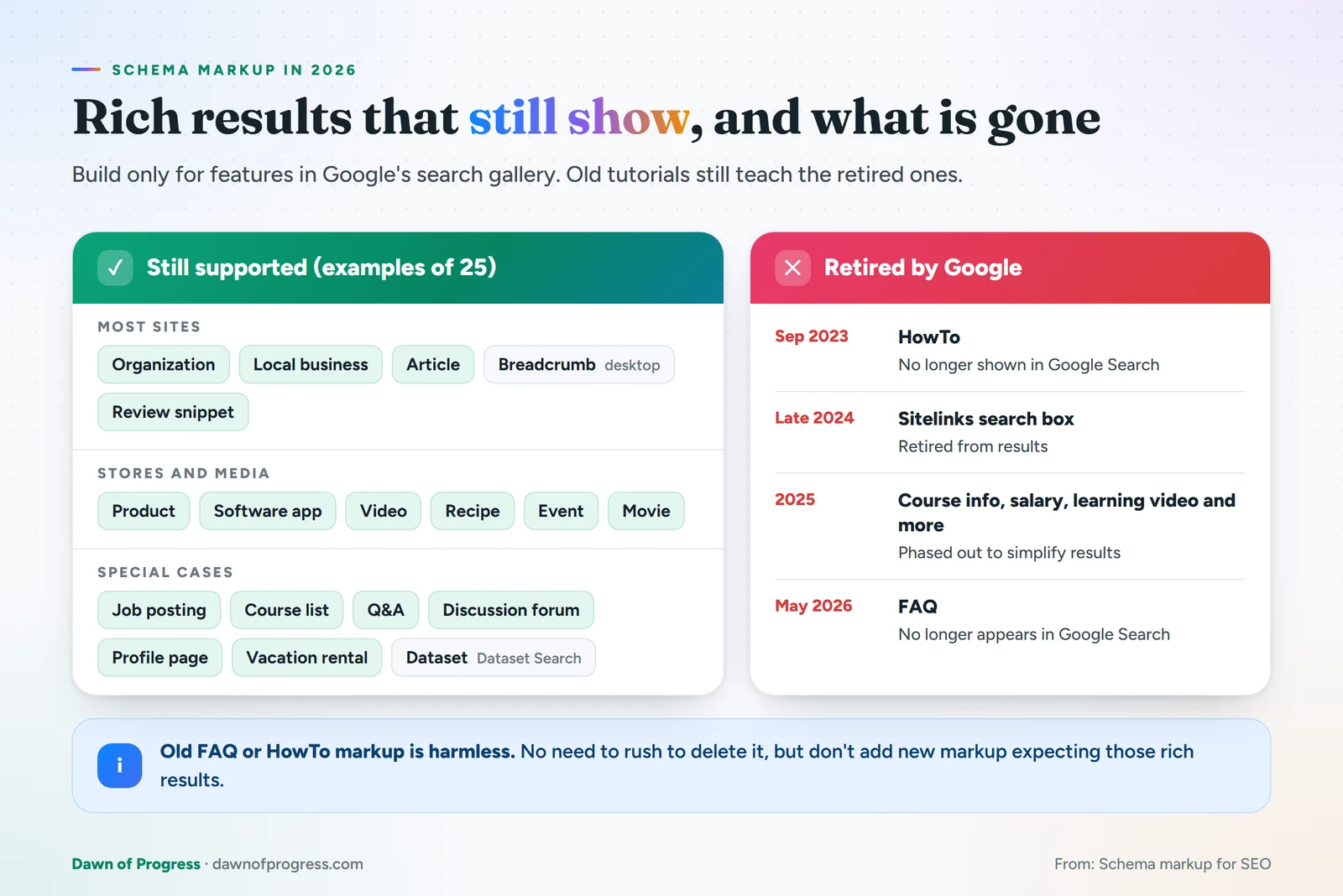
Google has been removing rich result types since 2023, so many older schema tutorials are now wrong. The source of truth is Google’s search gallery, which lists every structured data feature Google Search currently supports. As of November 2026, it lists 25 features:
| Group | Features Google still documents |
|---|---|
| Business and brand | Organization, Local business, Employer aggregate rating, Review snippet |
| Content | Article, Breadcrumb, Carousel, Image metadata, Speakable, Subscription and paywalled content, Profile page, Discussion forum, Q&A |
| Commerce | Product, Software app, Vacation rental |
| Media and events | Video, Event, Movie, Recipe |
| Education and data | Course list, Education Q&A, Math solver, Dataset |
| Jobs | Job posting |
A few of these have limits. Breadcrumb rich results currently show on desktop only, Dataset markup is used by Dataset Search rather than normal results. Always check the page for a feature before you build it.
What Google has retired
These are documented in Google’s Search Central blog and its Search documentation changelog:
| Feature | What happened |
|---|---|
| HowTo | Limited in August 2023, then removed. HowTo rich results stopped appearing in Google Search in September 2023. |
| FAQ | Limited to well-known government and health websites in August 2023. In May 2026 Google announced that FAQ rich results no longer appear in Google Search (from May 7, 2026), and removed the documentation in June 2026. |
| Course info, Estimated salary, Learning video, Special announcement, Vehicle listing, ClaimReview | Retirement announced June 2025 as part of simplifying the results page. Most documentation was removed in September 2025. |
| Practice problem | Deprecated November 2025, documentation removed January 2026. |
| Sitelinks search box | Retired in late 2024. |
Do you need to delete old FAQPage or HowTo markup? No. When Google limited these features in 2023 it said unused structured data causes no problems for Search. FAQPage and HowTo are still valid schema.org types that other tools can read. Remove them only if you’re cleaning up anyway, and stop adding them expecting a rich result.
Which schema types should most websites use?
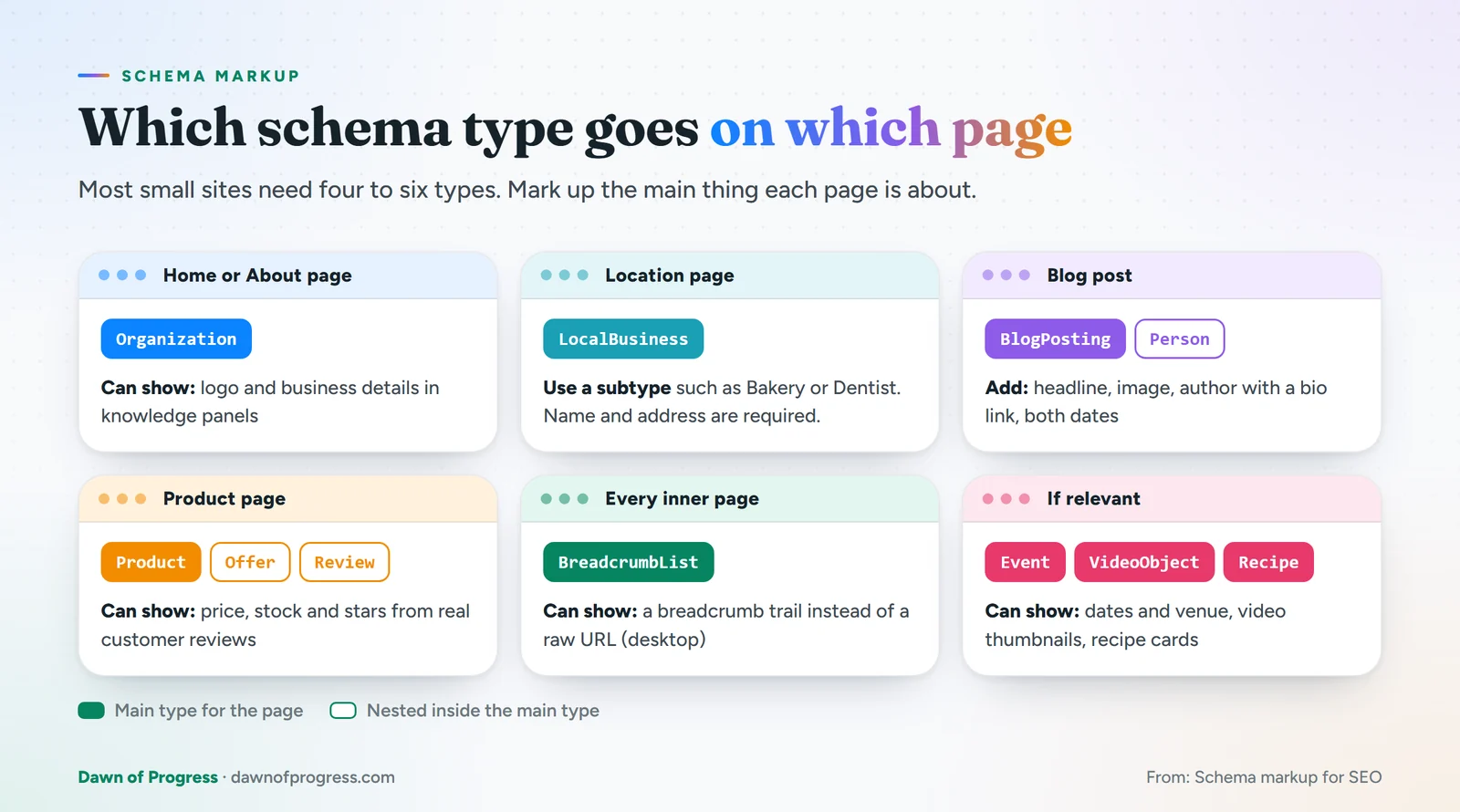
Most small sites need four to six types, not forty. Start with the ones that match real content on your pages.
| Schema type | Put it on | Possible Google feature | Who needs it |
|---|---|---|---|
| Organization | Home page or About page | Logo and details in knowledge panels | Every business or brand site |
LocalBusiness (or a subtype like Bakery, Dentist) | Home page or each location page | Business details in Search and Maps | Businesses with a physical location or service area |
| Article / BlogPosting | Every blog post or news article | Better title, image and date display | Blogs, publishers, content sites |
Product with offers and reviews | Each product page | Price, availability, review stars, Shopping listings | Online stores and product review sites |
| BreadcrumbList | Every page below the home page | Breadcrumb trail instead of a raw URL (desktop) | Any site with categories or a clear hierarchy |
| Person | Author bio pages, nested as author | Helps connect content to a named expert | Sites with named authors |
| Event | Each event page | Event date, venue and ticket details | Venues, trainers, organizers |
| VideoObject | Pages with an embedded video | Video thumbnail, duration, key moments | Any site publishing video |
| Recipe | Each recipe page | Recipe card with image, ratings and cook time | Food blogs and recipe sites |
Two rules from Google’s guidelines save trouble. Use the most specific type that fits (Bakery beats LocalBusiness). And required properties decide eligibility: miss one and the item can’t get a rich result, while recommended properties are optional extras.
Person markup supports the author signals covered in my guide to what E-E-A-T is. Local businesses should pair schema with a complete profile; see my Google Business Profile optimization guide.
What does JSON-LD schema markup look like?
Below are five copy-ready examples. Replace every value with your own real details. Each block goes inside the page’s HTML, usually in the <head>. Example values (example.com, prices, addresses) are placeholders, not real businesses.
A few JSON-LD basics before you copy:
"@context": "https://schema.org"tells machines which vocabulary you’re using."@type"names the thing you’re describing.- Text goes in double quotes. Numbers can go without quotes. Every property except the last in a block needs a comma after it.
- Dates use ISO 8601 format, such as
2026-11-28or2026-11-28T09:00:00+05:00. Google recommends including the timezone.
1. Organization (home page or About page)
Google’s Organization documentation has no required properties; it recommends adding as many relevant ones as you can. sameAs links your official profiles, which helps Google connect them to the same entity.
<script type="application/ld+json">
{
  "@context": "https://schema.org",
  "@type": "Organization",
  "name": "Example Studio",
  "url": "https://www.example.com/",
  "logo": "https://www.example.com/images/logo.png",
  "description": "Web design and SEO for small businesses.",
  "email": "hello@example.com",
  "telephone": "+1-555-010-0199",
  "sameAs": [
    "https://www.linkedin.com/company/example-studio",
    "https://www.youtube.com/@examplestudio"
  ]
}
</script>
2. LocalBusiness (location page)
name and address are required. Google recommends geo with at least five decimal places, telephone with the country code, url for the specific location, and openingHoursSpecification.
<script type="application/ld+json">
{
  "@context": "https://schema.org",
  "@type": "Bakery",
  "name": "Riverside Bakery",
  "image": "https://www.example.com/images/bakery-front.jpg",
  "url": "https://www.example.com/locations/riverside/",
  "telephone": "+1-555-010-0123",
  "priceRange": "$$",
  "address": {
    "@type": "PostalAddress",
    "streetAddress": "12 Mill Road",
    "addressLocality": "Springfield",
    "addressRegion": "IL",
    "postalCode": "62701",
    "addressCountry": "US"
  },
  "geo": {
    "@type": "GeoCoordinates",
    "latitude": 39.78172,
    "longitude": -89.65015
  },
  "openingHoursSpecification": [
    {
      "@type": "OpeningHoursSpecification",
      "dayOfWeek": ["Monday", "Tuesday", "Wednesday", "Thursday", "Friday"],
      "opens": "08:00",
      "closes": "18:00"
    },
    {
      "@type": "OpeningHoursSpecification",
      "dayOfWeek": "Saturday",
      "opens": "09:00",
      "closes": "14:00"
    }
  ]
}
</script>
Notice there’s no aggregateRating here. Google’s review snippet guidelines say pages using LocalBusiness or Organization markup are not eligible for star ratings about themselves (so-called self-serving reviews). Adding your own Google reviews to your own business markup won’t show stars and breaks the guidelines.
3. BlogPosting (every blog post)
Article markup has no required properties in Google’s documentation. The recommended ones are headline, image, author (with name and url), datePublished and dateModified. Put only the person’s name in author.name, and link author.url to a real bio page.
<script type="application/ld+json">
{
  "@context": "https://schema.org",
  "@type": "BlogPosting",
  "headline": "How to Choose a Wedding Cake Flavor",
  "image": [
    "https://www.example.com/images/cake-16x9.jpg",
    "https://www.example.com/images/cake-4x3.jpg",
    "https://www.example.com/images/cake-1x1.jpg"
  ],
  "datePublished": "2026-11-02T09:00:00-06:00",
  "dateModified": "2026-11-20T14:30:00-06:00",
  "author": {
    "@type": "Person",
    "name": "Jane Doe",
    "url": "https://www.example.com/about/jane-doe/"
  },
  "publisher": {
    "@type": "Organization",
    "name": "Riverside Bakery",
    "logo": "https://www.example.com/images/logo.png"
  }
}
</script>
Google recommends several high-resolution images in 16:9, 4:3 and 1:1 ratios. If you only have one good image, one is fine. My image optimization guide covers sizes and alt text.
4. Product with offers and reviews (product page)
A product snippet needs name plus at least one of offers, review or aggregateRating. Inside offers, price is required, and priceCurrency and availability are recommended. Only include ratings and reviews that real customers left and that appear on the page.
<script type="application/ld+json">
{
  "@context": "https://schema.org",
  "@type": "Product",
  "name": "Sourdough Starter Kit",
  "image": "https://www.example.com/images/starter-kit.jpg",
  "description": "Everything you need to grow a sourdough starter at home.",
  "sku": "SSK-001",
  "brand": {
    "@type": "Brand",
    "name": "Riverside Bakery"
  },
  "offers": {
    "@type": "Offer",
    "url": "https://www.example.com/shop/sourdough-starter-kit/",
    "price": 29.00,
    "priceCurrency": "USD",
    "availability": "https://schema.org/InStock",
    "itemCondition": "https://schema.org/NewCondition"
  },
  "aggregateRating": {
    "@type": "AggregateRating",
    "ratingValue": 4.7,
    "reviewCount": 38
  },
  "review": {
    "@type": "Review",
    "reviewRating": {
      "@type": "Rating",
      "ratingValue": 5,
      "bestRating": 5
    },
    "author": {
      "@type": "Person",
      "name": "Sam K."
    },
    "reviewBody": "Clear instructions and my starter was bubbling by day five."
  }
}
</script>
Online stores can add shipping and return policy details for merchant listings; see the Product section of the search gallery.
5. BreadcrumbList (every page below home)
A breadcrumb trail needs at least two ListItem entries, each with position, name and item (the URL). The last item can skip item, and Google will use the current page’s URL.
<script type="application/ld+json">
{
  "@context": "https://schema.org",
  "@type": "BreadcrumbList",
  "itemListElement": [
    {
      "@type": "ListItem",
      "position": 1,
      "name": "Shop",
      "item": "https://www.example.com/shop/"
    },
    {
      "@type": "ListItem",
      "position": 2,
      "name": "Baking kits",
      "item": "https://www.example.com/shop/baking-kits/"
    },
    {
      "@type": "ListItem",
      "position": 3,
      "name": "Sourdough Starter Kit"
    }
  ]
}
</script>
You can place several JSON-LD blocks on one page, for example BlogPosting and BreadcrumbList on the same post. Many plugins combine them into one @graph block, which works too.
How do you add schema markup to your website?
There are three common ways. Pick the one that matches how your site is built.
Option 1: WordPress plugins (easiest)
Popular SEO plugins add schema automatically:
- Yoast SEO outputs a connected set of Organization (or Person), WebSite, WebPage, Article and BreadcrumbList markup on every page once you fill in its site settings.
- Rank Math has a schema module where you choose a default type per post type and can add types such as Product, Event, Recipe or Video to individual posts.
- All in One SEO offers similar defaults plus per-post schema types.
- WooCommerce adds Product markup to product pages on its own.
Fill in the plugin’s organization or person details first, because they feed every page. Never run two SEO plugins at once: you’ll get duplicate, conflicting markup.
Option 2: Add it manually in the head
On a custom site, a static site or a theme you control:
- Write or generate the JSON-LD block for the page type.
- Paste it inside the page’s
<head>(the body works too, but the head is tidier). - For repeating templates (every product, every post), fill the values from your database or CMS fields so the markup always matches what’s on the page.
- Publish, then test the live URL.
Add each block only to the pages it describes. Organization markup sitewide is fine; the same Product markup on every page is not.
Option 3: Google Tag Manager (with caveats)
Google’s guide to generating structured data with JavaScript confirms you can add JSON-LD through a Custom HTML tag in Google Tag Manager. The caveats:
- Product pages: Google warns that dynamically generated markup can make Shopping crawls less frequent and less reliable, which matters for prices and stock levels. Put Product markup in the HTML instead.
- Mismatch risk: if you type values into GTM by hand, they drift out of date. Pull values from the page with variables instead.
- Testing: use the URL option in the Rich Results Test, not the code option, because pasted code can’t run JavaScript.
Use GTM as a stopgap; long-term, put markup in the page itself.
Should you use a schema markup generator?
A generator is a form that turns your answers into JSON-LD, such as the free Schema Markup Generator on TechnicalSEO.com. It’s great for one-off pages like your home page. For templates, use a plugin or CMS fields instead, because a pasted block doesn’t update when the price or date changes.
AI chat tools can draft JSON-LD too, and I use them for first drafts. Check the output against Google’s documentation: they still suggest retired FAQ and HowTo rich results and sometimes invent properties.
How do you test schema markup?
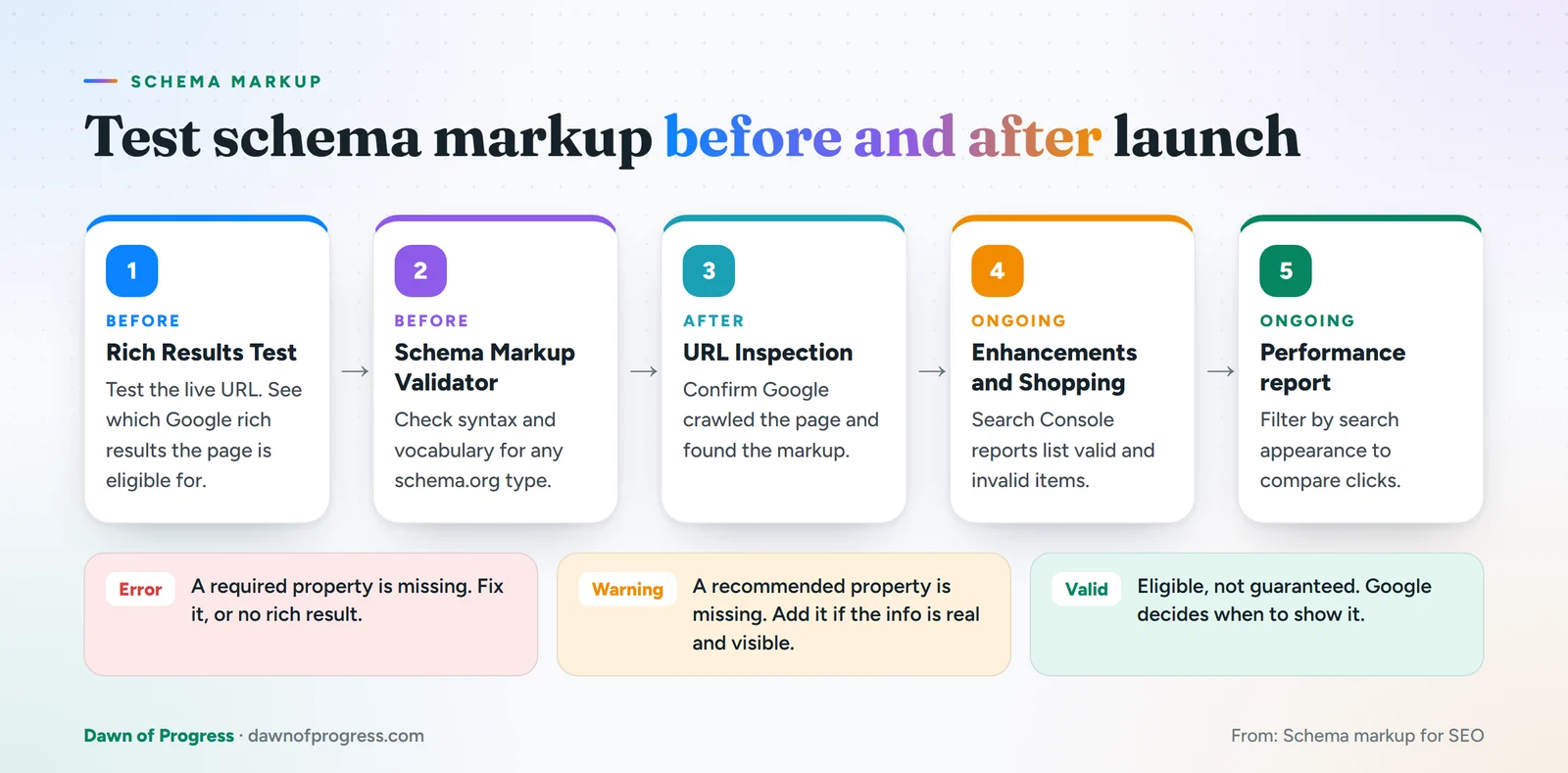
Test before you publish and keep watching after, using Google’s own tools.
- Rich Results Test (
search.google.com/test/rich-results). Paste a live URL. It shows which Google rich results the page is eligible for, with errors and warnings for each item. Use this first. - Schema Markup Validator (
validator.schema.org). Checks any schema.org markup, including types Google doesn’t use for rich results. Use it for general syntax and vocabulary checks. - URL Inspection in Search Console. Confirms Google has crawled the live page and found the markup.
- Enhancements reports in Search Console. After Google recrawls your pages, rich result reports appear in the left-hand menu under Enhancements (for example Breadcrumbs, Videos, Review snippets), while Product snippets and Merchant listings sit under Shopping. Each report shows Valid and Invalid items, plus non-critical issues to improve.
- Performance report. Filter by Search appearance to see clicks and impressions for pages shown as rich results, and compare periods before and after you added markup.
What to do with the results:
| You see | What it means | What to do |
|---|---|---|
| Error | A required property is missing or invalid | Fix it. The item can’t get a rich result until you do. |
| Warning | A recommended property is missing | Add it if the information is real and visible. Otherwise it’s safe to leave. |
| “No items detected” | Google didn’t find markup it supports | Check the code is on the live page, not blocked by robots.txt or noindex, and uses a supported type |
| Valid but no rich result in Search | Normal. Eligibility isn’t a guarantee. | Wait for recrawls, improve the page, check for a manual action |
After fixing an issue on a template, open the issue in the Search Console report and start validation. My Google Search Console guide walks through the reports, and schema is one line in my technical SEO checklist.
Does schema markup help with AI search?
Not in any special way, according to Google. Its guide to optimizing for generative AI features says structured data isn’t required for generative AI search and that there’s no special schema.org markup you need to add. Its AI features page adds that there are no additional technical requirements to appear in AI Overviews or AI Mode, and lists “structured data matches the visible text” as a general best practice.
So what’s the honest position?
- It helps machines read facts. Clear markup for your business name, address, prices, authors and dates removes guesswork for any system that reads your page, including search engines that feed AI answers.
- It is not an AI ranking lever. No schema type gets you cited in AI Overviews, ChatGPT or Perplexity. Being indexed, useful, specific and trusted does.
- Consistency matters more than code. Make sure the facts in your markup match your page, your Google Business Profile and your other profiles.
Add schema for rich results and clarity, then put your AI effort into content and reputation, as I explain in SEO vs GEO.
What are the most common schema markup errors and policy violations?
Technical errors stop markup from being read. Policy violations can lead to a manual action, a penalty applied by a Google reviewer. A structured data manual action removes rich result eligibility (Google says it doesn’t change web search ranking) until you fix it and request a review.
Technical errors
- Broken JSON: a missing comma or bracket, or curly “smart” quotes pasted from a word processor. One typo breaks the whole block.
- Missing required properties: for example a Product with
offersbut noprice, or a LocalBusiness with noaddress. - Wrong value formats: dates not in ISO 8601, prices with currency symbols (
"$29"instead of29.00pluspriceCurrency), relative image URLs instead of full ones. - Blocked resources: markup on pages or images that robots.txt blocks or that carry
noindex. - Duplicate markup: a theme and a plugin both outputting Product markup with different values.
Policy violations
- Marking up content that isn’t visible. Google’s rule is plain: don’t mark up content that visitors can’t see. FAQ answers, reviews or prices that only exist in the JSON-LD are a violation.
- Fake or undisclosed incentivized reviews. Google’s review snippet guidelines say not to include fake reviews, or reviews written in exchange for a benefit without clear disclosure, on the page or in markup.
- Self-serving reviews. Star ratings about your own business in your LocalBusiness or Organization markup aren’t eligible.
- Irrelevant or misleading markup. The markup must be a true representation of the page. Marking up a blog post as an Event or a service page as a Product to chase a rich result is misleading.
Check Security & Manual actions > Manual actions in Search Console if your rich results disappear for no technical reason.
What schema markup mistakes should you avoid?
- Building for retired features. Many tutorials still teach FAQ, HowTo or Sitelinks search box markup for rich results that no longer exist. Check the search gallery first.
- Marking up everything. Fifteen types on a page don’t help. Mark up the main thing the page is about, plus breadcrumbs and site-wide organization data.
- Letting markup go stale. A sale price that ended in March, or an event date that has passed, is a mismatch. Generate markup from the same data that shows on the page.
- Using a generic type when a specific one exists.
LocalBusinesswhenDentistorPlumberexists, orArticlewhenBlogPostingorNewsArticlefits better. - Expecting rankings. Schema supports a strong page. It doesn’t replace one. If a page isn’t indexed or ranking, fix that first; my SEO audit guide shows how to find the real problem.
One last tip from experience: when a client’s stars or prices vanish from results, the cause is usually a theme or plugin update that changed or duplicated the markup. Retest key templates after every major update.
Frequently asked questions
Is schema markup still relevant in 2026?
Yes. Google still supports 25 structured data features, including Product, Recipe, Event, Video, Article, Breadcrumb and Local business. Some features, like FAQ and HowTo rich results, are gone, so focus on the types that are still supported.
Is there a schema generator for JSON-LD?
Yes. Free options include the Schema Markup Generator on TechnicalSEO.com and the schema features in Yoast SEO, Rank Math and All in One SEO. Always test the generated code in the Rich Results Test before relying on it.
Does AI use schema markup?
AI systems can read structured data on pages they crawl, but Google says no special schema is needed for its AI features. Treat schema as a way to state your facts clearly, not as a shortcut into AI answers.
Where do I put JSON-LD on my page?
Inside a <script type="application/ld+json"> tag, usually in the <head>. Google can also read it in the body or when injected with JavaScript, though Product markup is safer in the HTML.
How long does it take for rich results to appear?
It depends on how often Google recrawls your pages, typically days to a few weeks for an active site (an estimate). You can request indexing in Search Console’s URL Inspection tool to speed up recrawling of key pages.
Related guides
If you’d rather have schema set up and tested across your site, you can work with me.

