
Last updated: November 2026. Written by Syed Usman Riaz.
Keyword research is the process of finding the words and questions your customers type into Google, Bing and AI assistants, then deciding which ones deserve a page on your site. To do it, start with a few seed topics, expand them with free tools such as Google Keyword Planner, Search Console and Google’s own suggestions, check the search intent behind each phrase, judge difficulty and business value honestly, and group the keepers so that each page answers one intent. AI tools speed up the brainstorming and grouping, but the numbers and the final choice must come from real data.
This guide walks through the full process with free tools only, shows a worked example for a small business, and ends with a template you can copy.
Key takeaways
- Intent beats volume. A keyword with 50 searches from ready-to-buy customers is worth more than 5,000 searches from people who only want a definition.
- Free tools are enough to start. Keyword Planner, Search Console, Google suggestions, Google Trends and Bing Webmaster Tools cover most needs.
- Look at the live results before you decide. The top 10 pages tell you what Google thinks the searcher wants and how hard it will be.
- One intent per page. If two keywords show the same results, they belong on one page. If the results differ, make two pages.
- Use AI for ideas and grouping, not numbers. ChatGPT, Gemini and Claude can’t see real search volume. Verify everything with a data tool.
What is keyword research?
Keyword research is the work of discovering what people search for in your topic, how many of them search, what they expect to find, and which of those searches can bring you customers. A keyword is simply the phrase someone types or speaks into a search box, such as “cake delivery near me” or “how to fix a leaking tap”. It does not have to be one word; most keywords are phrases.
The output is not a long spreadsheet. It is a short list of pages to create or improve, each with one main keyword, a few variations and a clear idea of what the searcher wants. That list guides your titles, headings and content, covered in the on-page SEO guide.
New to search? Read what is SEO first. Keyword research tells the rest of your SEO where to aim.
Do keywords still matter for SEO in 2026?
Yes, but not in the old way. Google no longer needs you to repeat an exact phrase to understand a page. Its SEO Starter Guide says its systems can connect a page to searches it doesn’t explicitly mention, and that keyword stuffing is against Google’s spam policies. The same guide confirms Google doesn’t use the meta keywords tag at all.
What still matters is the language and the need behind the keyword. Your page should use the words your customers use, and keyword research is how you find those words, the questions around them and the intent behind them. AI search makes this more important: AI Overviews, AI Mode and chat assistants answer the follow-up questions too, so you need to know what they are. More in SEO vs GEO.
What is search intent, and what types are there?
Search intent is the reason behind a search: what the person wants to know, do or buy. Matching intent is the most important part of keyword research, because a page that answers the wrong need won’t rank for long, however well it is written.
| Intent type | What the searcher wants | Example keywords | Page that fits |
|---|---|---|---|
| Informational | To learn or understand something | “what is sourdough”, “how to store a cake” | Guide, how-to, blog post |
| Navigational | To reach a specific site or brand | “Canva login”, “Ahrefs blog” | The brand’s own page (rarely worth targeting for others) |
| Commercial | To compare options before buying | “best wedding cake bakery”, “Shopify vs WordPress” | Comparison, review, “best of” list, service page with proof |
| Transactional | To buy, book or contact now | “order birthday cake online”, “hire SEO consultant” | Product page, service page, booking page |
| Local | To find something nearby | “bakery near me”, “plumber in Leeds” | Google Business Profile, location page |
Google’s Search Quality Rater Guidelines use different labels (Know, Do, Website and Visit-in-person) for the same idea.
To check intent, search the keyword and look at the top results. Ten how-to guides means informational; product pages and a map mean the searcher wants to buy or visit. Don’t fight what the results show.
How do you do keyword research, step by step?
Here is the full process in eight steps. Each one is explained in the sections that follow.
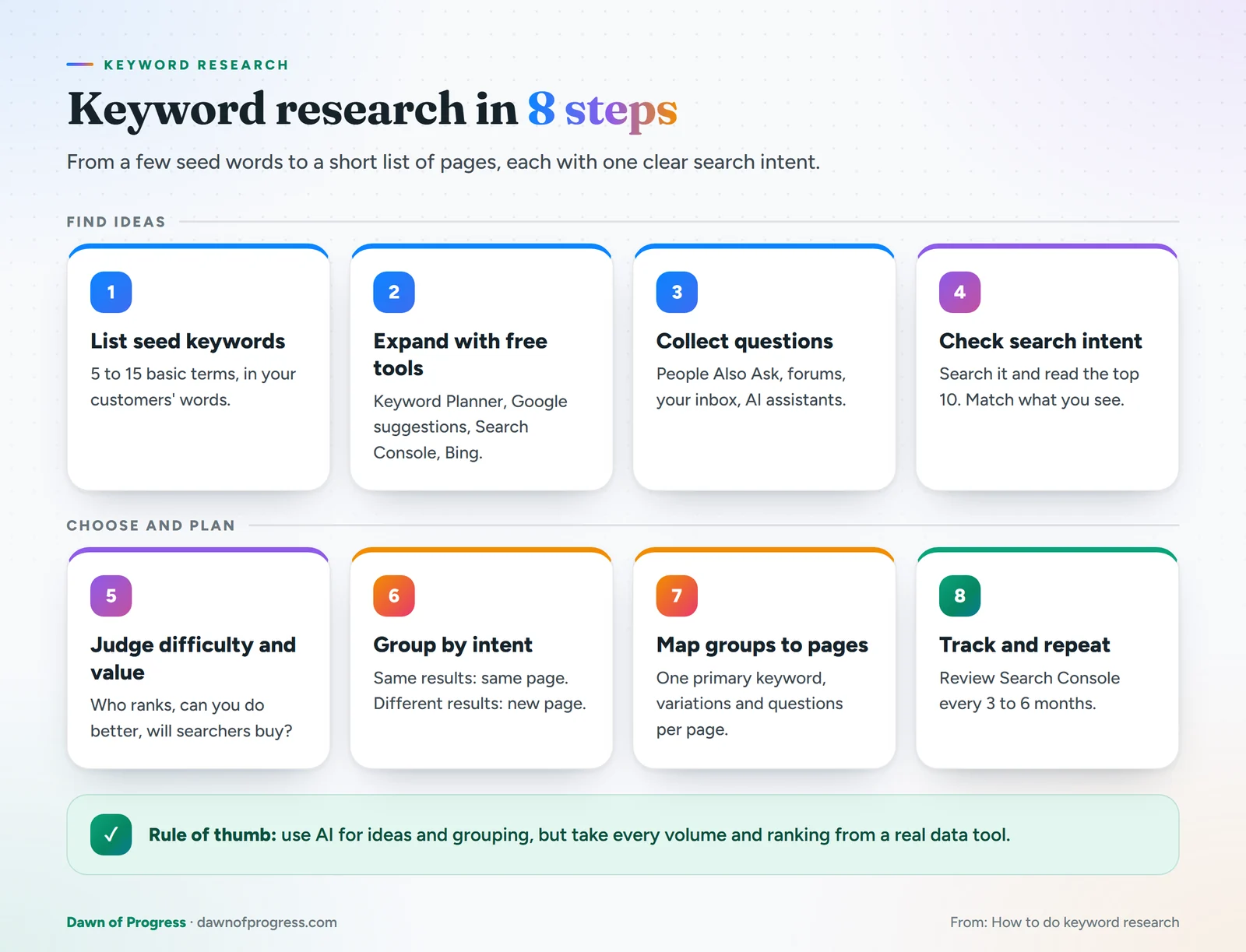
- List seed keywords: the 5 to 15 basic terms that describe what you sell or teach.
- Expand them with free tools: Keyword Planner, Google suggestions, Search Console, Bing.
- Collect questions from People Also Ask, customers, forums and AI assistants.
- Check the intent of each promising keyword by looking at the live results.
- Judge difficulty and value honestly, for your site as it is today.
- Group keywords that share the same intent and the same results into one page.
- Map each group to a page, new or existing, and note what that page needs.
- Track and repeat every few months using Search Console data.
Step 1: Write down your seed keywords
A seed keyword is a short, broad term that describes your business or topic, such as “birthday cakes” or “bookkeeping”. Write them in your customers’ words, not your industry’s. A dentist may say “dental prophylaxis”; patients search “teeth cleaning”.
Good sources for seeds: your service list, your product categories, the questions customers ask on the phone, your competitors’ menus and your own sales emails. Prefer specific phrases (“custom birthday cakes”) over single words (“cake”), because single words mix too many intents.
Step 2: Expand seeds into a longer list
Run each seed through the free tools in the next section and copy every relevant idea into one sheet. Collect generously now and judge later.
Step 3: Collect the questions people ask
Questions are where beginners find their easiest wins. Gather them from People Also Ask, Search Console, Reddit and niche forums, and your own inbox. Every question customers ask you repeatedly is a keyword candidate.
Which free keyword research tools should you use?
You don’t need a paid tool to do good keyword research. Paid tools such as Ahrefs or Semrush save time and add difficulty scores, but the free tools below come straight from the search engines.
| Tool | What it’s best for | Limits to know |
|---|---|---|
| Google Keyword Planner | Volume estimates and new ideas from seeds or a competitor URL | Built for advertisers; needs a Google Ads account; volumes are grouped and often shown as ranges |
| Google Search Console | Queries you already appear for, with clicks, impressions and position | Only shows your own site; some rare queries are hidden for privacy |
| Google autocomplete, People Also Ask, related searches | Real phrasing and questions people use | No volume numbers |
| Google Trends | Seasonality and whether interest is rising or falling | Shows relative interest (0 to 100), not search counts |
| Bing Webmaster Tools Keyword Research | Organic search data from Bing, by country and device | Bing’s audience is smaller and differs from Google’s |
Google Keyword Planner
Keyword Planner lives inside Google Ads under Tools. It has two options: Discover new keywords (enter words or a website to get ideas) and Get search volume and forecasts (paste a list to see estimates). Google’s Keyword Planner help page notes that you need to finish account setup, including billing details, to use it. You don’t have to run an ad.
Two cautions. Its “Competition” column means competition among advertisers, not how hard it is to rank organically. And accounts without active ad spend usually see broad ranges such as “1K to 10K” instead of exact numbers, which is still enough for prioritising.
Google Search Console
Search Console‘s Performance report shows the actual searches your pages appeared for, with clicks, impressions, click-through rate and average position, for up to 16 months. This is the most honest keyword data you’ll ever get, because it is about your site. Two quick uses:
- Find striking-distance keywords: sort queries by impressions and look for ones with an average position between about 8 and 20. These pages are close to page one and often need only a better title, a clearer section or an internal link.
- Find questions: add a query filter, choose Custom (regex) and use a pattern such as
^(how|what|why|when|which|can|does|is)\bto list question searches you already appear for.
My Google Search Console guide covers setup and the other reports.
Google autocomplete, People Also Ask and related searches
Type a seed into Google and note the suggestions, then add letters (“birthday cakes a”) and question words (“how birthday cakes”). Open People Also Ask questions (each click loads more) and scroll to the related searches at the bottom. It’s free, current and in your customers’ exact words. Use a private window so your history doesn’t skew results.
Google Trends
Google Trends shows how interest in a term changes over time and between regions, on a scale of 0 to 100. Use it to spot seasonality (cake orders peak around holidays), compare two phrasings (“cupcakes” vs “fairy cakes” in the UK) and check that a topic isn’t fading before you invest in it. It does not give search counts.
Bing Webmaster Tools Keyword Research
Bing Webmaster Tools has a free Keyword Research tool based on Bing’s organic search data. You can filter by country, language and device, and see related and question keywords. It’s worth a look because Bing data also feeds Microsoft Copilot, and it gives you a second opinion when Keyword Planner shows only ranges.
How do you judge keyword difficulty and value honestly?
Paid tools give a “keyword difficulty” score, each calculated differently, mostly from the backlinks of pages that already rank. Treat it as a hint. The better test is to read the top 10 results yourself and ask four questions:
- Who ranks? If page one is all national brands, government sites or giant publishers, a new site will struggle. If you see small business sites, forum threads or thin, outdated pages, there is room.
- How good are the pages? Could you write something clearly more useful, more current or more specific? If not, pick another keyword.
- What format wins? Lists, tools, videos, product pages, local map results. If you can’t produce that format, skip it.
- How much of the page is taken by Google itself? AI Overviews, ads, maps and video carousels push organic results down. Some searches are answered on the page and get few clicks; see zero-click searches.
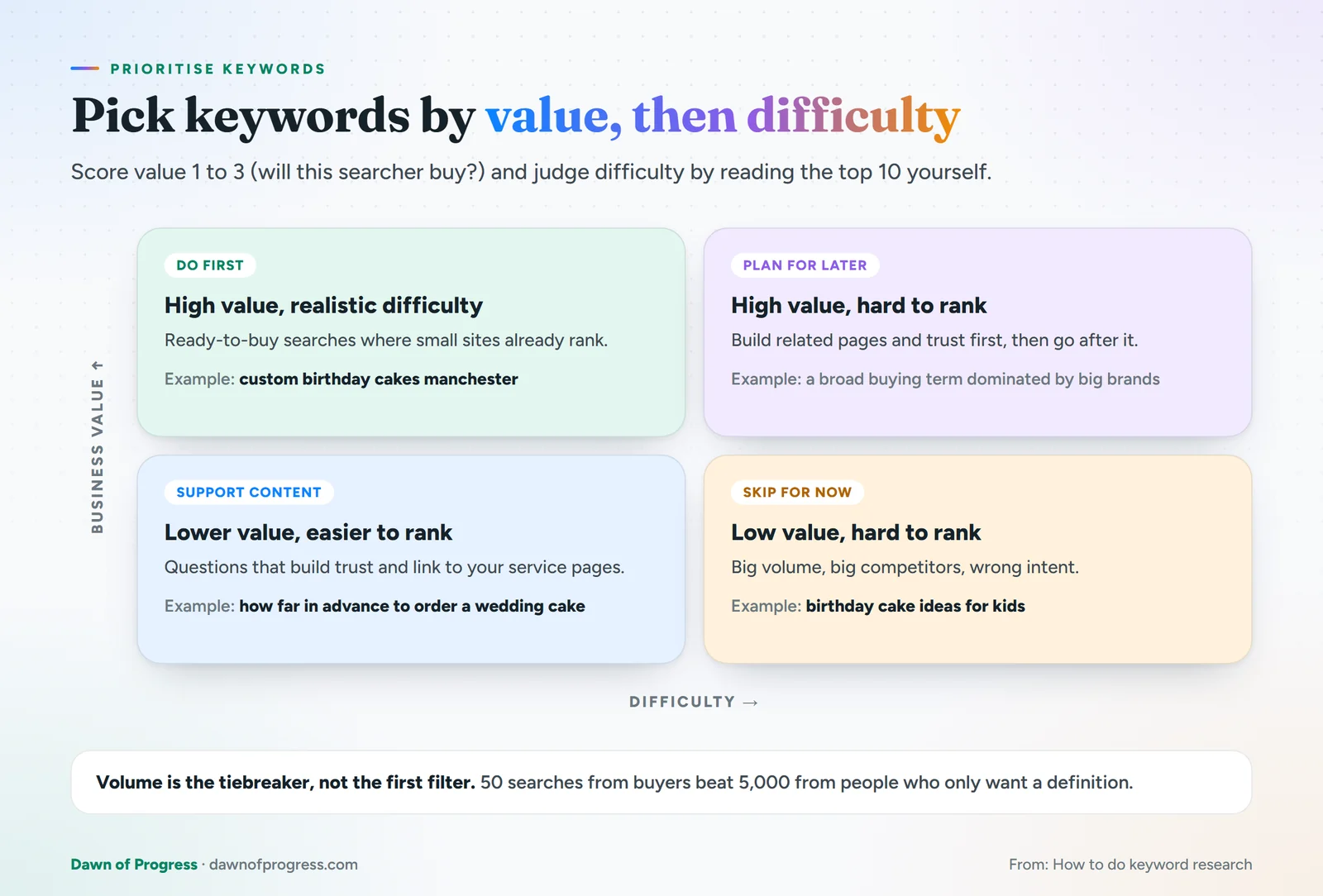
Then score business value: how likely is someone searching this to become a customer? I use a simple 1 to 3 scale. 3 means the searcher is ready to buy what you sell. 2 means they are researching a problem you solve. 1 means the topic is related but they are unlikely to buy. In my client work since 2014, the keywords that paid for themselves were almost always the boring 3s with modest volume, not the big 1s.
A simple priority rule: work on keywords with high value, realistic difficulty and an intent you can serve. Volume is the last tiebreaker, not the first filter.
What are long-tail keywords, and why should beginners target them?
Long-tail keywords are specific, usually longer searches with fewer searches each, such as “eggless birthday cake for 20 people” instead of “birthday cake”. The name comes from the shape of a demand curve: a few short terms have huge volume (the head), and a very long list of specific terms each have small volume (the tail).
Long-tail keywords are the best place to start for three reasons:
- Clearer intent. “Eggless birthday cake delivery Manchester” says exactly what the person wants; “cake” says nothing.
- Less competition. Big sites rarely write pages for very specific needs, so smaller sites can rank.
- Better conversion. Specific searches come from people further along in their decision.
Question keywords are a type of long-tail keyword: “how far in advance should I order a wedding cake”, “can you freeze a buttercream cake”. They are perfect for guides and FAQ sections, and they are exactly the kind of follow-up questions AI answers draw from.
Long-tail keywords don’t each need their own page. Many belong as sections inside one strong page, as the next section explains.
How do you group keywords into pages without cannibalization?
Group keywords by intent and results, not by similar words. Keyword cannibalization happens when two or more of your pages target the same intent, so they compete with each other and Google can’t tell which one to rank. Usually neither ranks as well as one combined page would.
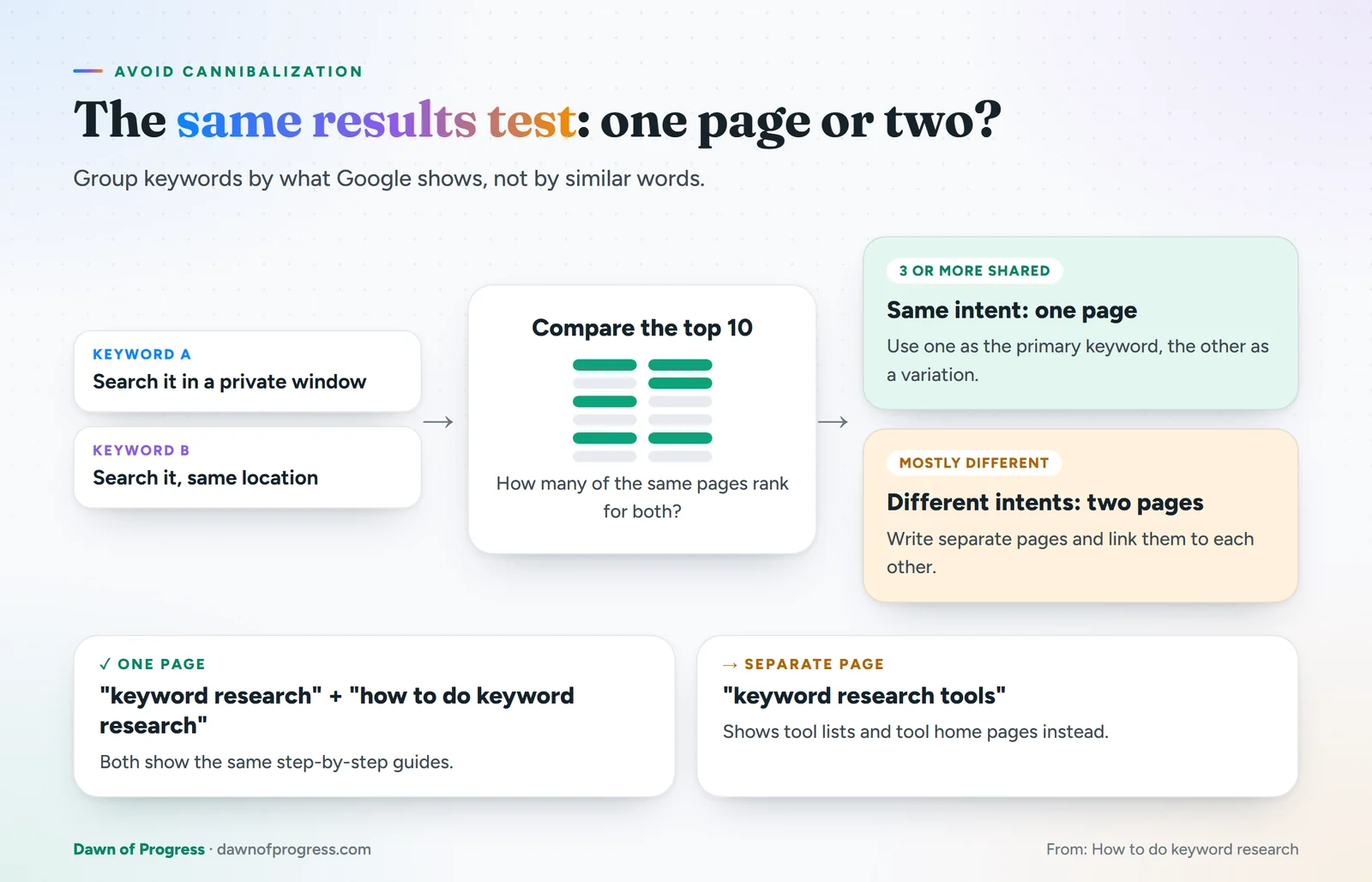
Use the same results test to decide:
- Search keyword A and keyword B separately (private window, same location).
- Compare the top 10 results.
- If several of the same pages rank for both (as a rule of thumb, 3 or more of the top 10), Google sees them as one intent. Put both on one page.
- If the results are mostly different, they are different intents. Make separate pages and link them to each other.
Example: “keyword research” and “how to do keyword research” show largely the same guides, so they belong on one page, this one. “Keyword research tools” shows tool lists and tool home pages, a different intent, so it deserves its own page.
Give each group one primary keyword (used in the title and first heading), a few secondary keywords (close variations) and a list of questions to answer as H2s or FAQs. Check existing pages before writing new ones: improving a page you have often beats creating a near-duplicate.
How can you use AI tools like ChatGPT, Gemini and Claude for keyword research?
AI assistants are good at brainstorming seeds and questions, grouping a long list into topics and drafting a content plan. They are bad at numbers: a chat assistant can’t see real search volume or rankings unless connected to a data tool, and it will invent plausible figures if asked. Never copy volumes or difficulty scores from a chat answer.
A workflow that works:
- Brainstorm with AI: ask for seeds and customer questions in plain language.
- Verify every idea in Keyword Planner, Search Console or Bing. Delete anything with no real demand.
- Cluster with AI: paste your verified list and ask it to group by intent.
- Check the groups with the same results test for anything borderline.
- Decide yourself which pages to create, based on value and difficulty.
Prompt: brainstorm keywords
“I run [business] in [city/country] for [type of customer]. List 40 search phrases my customers might type into Google before buying, in their words, not industry jargon. Split them into informational, commercial, transactional and local intent. Then list 20 questions they ask before buying. Do not give search volumes.”
Prompt: cluster a verified list
“Here is my keyword list with real monthly volumes from Google Keyword Planner: [paste]. Group these into page topics so that each group has one search intent. For each group give: a suggested primary keyword, secondary keywords, the page type that fits (guide, service page, product page, comparison) and any keywords that might cannibalise another group. Don’t change or add numbers.”
For a deeper look at AI in SEO work, see how to use AI for a smarter SEO strategy and my AI + SEO workflow.
How do you research the prompts people ask AI assistants?
People now ask ChatGPT, Gemini, Copilot and Google AI Mode longer, conversational questions, such as “I need a birthday cake for a child with a nut allergy in Manchester, who can do it by Saturday?” There is no Keyword Planner for these prompts, and AI companies don’t publish prompt volumes. So treat prompt research as qualitative, not a numbers exercise.
Practical ways to do it:
- Turn your long-tail keywords and questions into full prompts and test them in several assistants. Note which businesses and pages get mentioned and which follow-up questions the assistant raises.
- Read the follow-up questions. AI tools break one question into several smaller searches (often called query fan-out). The sub-topics they cover (price, timing, allergies, delivery area) are the sections your page should answer.
- Check your own data. Search Console includes searches from Google’s AI features in its reports, and Bing Webmaster Tools reports AI citations and sample grounding queries. GA4 can show visits from AI assistants.
- Ask customers how they found you.
A page built from solid keyword research, with clear answers to the real questions, is also the kind of page AI answers cite.
Worked example: keyword research for a small bakery
Imagine a small bakery in Manchester that makes custom celebration cakes and wants more online orders. This is an illustrative example, not a client case, and the volume labels are relative estimates rather than real figures.
Seeds: custom cakes, birthday cakes, wedding cakes, cake delivery, eggless cakes.
Expansion: Keyword Planner and Google suggestions add phrases such as “custom birthday cakes Manchester”, “eggless birthday cake”, “wedding cake prices”, “cake delivery Manchester same day”, “number cake”, “how far in advance to order a wedding cake” and “birthday cake ideas for kids”.
Intent and difficulty check:
- “birthday cake ideas for kids” shows Pinterest, big recipe sites and image packs. Informational, hard, low value. Skip for now.
- “custom birthday cakes Manchester” shows a map pack and local bakery sites. Transactional and local, beatable, high value. Priority page.
- “eggless birthday cake” and “eggless birthday cake Manchester” share several results with local bakeries. Same page, as a section of the birthday cakes page or its own page if the bakery specialises in it.
- “how far in advance to order a wedding cake” shows short guides from bakeries and wedding sites. Informational but close to buying. Good blog post that links to the wedding cakes page.
- “wedding cake prices” shows guides with price ranges. Commercial. Answer it on the wedding cakes page with honest price ranges.
Resulting plan: three service pages (birthday, wedding, eggless or allergy-friendly cakes), one delivery-area page, two question-led guides, and a fully completed Google Business Profile for the “near me” searches (see the Google Business Profile optimization guide). Six focused pages instead of fifty thin ones.
What should a keyword research template include?
Keep your research in one simple sheet. Here is the layout I recommend, filled in with rows from the bakery example (volumes shown as estimates):
| Keyword | Intent | Volume (est.) | Who ranks now | Value (1 to 3) | Group / target page | Action |
|---|---|---|---|---|---|---|
| custom birthday cakes manchester | Transactional, local | Low to medium | Local bakeries, map pack | 3 | /birthday-cakes/ | Create service page |
| eggless birthday cake manchester | Transactional, local | Low | Local bakeries | 3 | /birthday-cakes/ (section) | Add section with photos |
| wedding cake prices | Commercial | Medium | Wedding sites, guides | 2 | /wedding-cakes/ | Add price ranges and FAQ |
| how far in advance to order a wedding cake | Informational | Low | Bakery blogs | 2 | /blog/order-wedding-cake-timeline/ | Write guide, link to service page |
| cake delivery manchester same day | Transactional, local | Low | Delivery apps, bakeries | 3 | /cake-delivery/ | Create page with delivery map |
| birthday cake ideas for kids | Informational | High | Pinterest, recipe sites | 1 | None | Skip for now |
Add “Date checked” and “Current position” (from Search Console) columns once pages are live. When you write, use each group to set the title tag and meta description.
What are the most common keyword research mistakes?
- Chasing volume. Big numbers attract big competitors and often the wrong intent. Start with value.
- Skipping the live results. Tools can’t tell you that page one is all videos or maps. Your own eyes can.
- One page per keyword variation. “Cake shop Manchester” and “Manchester cake shop” don’t need two pages. That’s how cannibalization starts.
- Trusting AI numbers. If a chat assistant gives you volumes without a connected data source, they are guesses.
- Ignoring Search Console. The keywords you already appear for are usually the quickest wins.
- Doing it once. Demand, competitors and search features change. Revisit your list every three to six months.
Frequently asked questions
How do I do keyword research for free?
Combine Keyword Planner (volume ranges), Google suggestions and People Also Ask (phrasing and questions), Search Console (your own queries), Google Trends (seasonality) and Bing Webmaster Tools. All are free.
How many keywords should I target per page?
One primary keyword and a handful of close variations or questions that share the same intent. If a keyword needs a different answer, it needs a different page.
How many keywords per 1,000 words?
There is no target number or keyword density to hit. Use the main keyword in the title, the first heading and the opening paragraph, then write naturally and cover the related questions. Google’s systems understand synonyms and context.
How long does keyword research take?
For a small business with one service area, a first round usually takes a few hours to a day, by my estimate. Larger sites or new markets take longer. After that, a short review every few months is enough.
Can ChatGPT do keyword research?
It can brainstorm ideas, suggest questions and group a list you give it. It can’t see real search volumes or rankings unless connected to a data tool, so verify every keyword in Keyword Planner, Search Console or a paid tool before you act.
Do I need a paid tool like Ahrefs or Semrush?
Not to start. Paid tools add difficulty scores, competitor keyword lists and faster workflows, which matter when you manage many sites or clients. You can find the tools I use on my tools page.
How do I learn SEO as a beginner?
Start with the basics of how search works, then practise keyword research and on-page SEO on one real site. My what is SEO guide is a good first step.


