
Last updated: November 2026. Written by Syed Usman Riaz.
Search intent (also called user intent or keyword intent) is the goal behind a search: what the person actually wants to learn, find, compare or do. The four classic types are informational, navigational, commercial investigation and transactional, and local and “do” intent are useful extras. Google ranks pages that satisfy that goal, so the fastest way to find the right intent is to search the keyword yourself and copy what the top results have in common: their page type, format and angle. A great page built for the wrong intent will not rank, however well it is written.
This guide explains each intent type with examples, shows you how to read a results page step by step (with a worksheet you can copy), covers mixed intent and intent that changes over time, and walks through fixing a page that ranks poorly because it answers the wrong question. It ends with how intent works in AI search, common mistakes and FAQs.
Key takeaways
- Intent decides the page type before you write a word. A guide, a product page, a comparison and a local page each suit a different intent.
- The live results page is your best evidence. Search the keyword in a private window and note the page types, formats, angles and SERP features you see.
- One page, one intent. If two keywords bring back completely different results, they need two pages.
- Intent changes. Check your most important keywords again every few months, and after big news or seasonal shifts.
- AI search splits one question into many. Pages that answer the main question and its follow-ups clearly have more chances to be cited.
What is search intent?
Search intent is the reason someone types or speaks a query. The words are what they say; the intent is what they need. “Running shoes” could mean “show me shoes to buy”, “which running shoes are good” or “how do running shoes differ from walking shoes”. Google’s job is to guess the most likely need and show the pages that meet it.
You will see three names for the same idea:
- Search intent: the most common SEO term.
- User intent: the same thing, viewed from the person’s side.
- Keyword intent: the intent label a tool such as Semrush or Ahrefs attaches to a keyword.
The idea is older than most SEO tools. Andrei Broder’s 2002 paper “A taxonomy of web search” sorted queries into navigational, informational and transactional, and the SEO industry later split “commercial investigation” out of transactional. If you are new to the wider topic, start with what is SEO, then come back here.
Why does Google reward pages that match search intent?
Google’s whole system is built to answer one question: did the searcher get what they came for? Two pieces of public Google material show how directly intent is tied to quality.
Google’s helpful content guidance. Google’s guide to creating helpful, reliable, people-first content asks site owners whether someone will “leave feeling they’ve learned enough about a topic to help achieve their goal”. A page that answers a different goal fails that test even if it is accurate and well written.
The Search Quality Rater Guidelines. Google pays human raters to judge sample results, and their handbook (Search Quality Rater Guidelines PDF) asks them to work out the user’s intent first, then give each result a Needs Met rating on a scale from “Fully Meets” through “Highly”, “Moderately” and “Slightly Meets” down to “Fails to Meet”. The guidelines sort queries into groups such as Know (including Know Simple), Do, Website and Visit-in-Person, which map closely onto the intent types below.
Two accuracy points matter here. Rater scores do not rank individual pages; Google says they are used to check whether its systems are working well (Google’s overview of the rater guidelines). And “Needs Met” is a rater concept, not a ranking factor you can measure. But the guidelines show what Google is aiming its ranking systems at: results that meet the searcher’s need. That is why intent match shows up in every on-page SEO checklist.
What are the types of search intent?
Most SEO tools and guides use four main types. I add two extensions because they change the page you build.
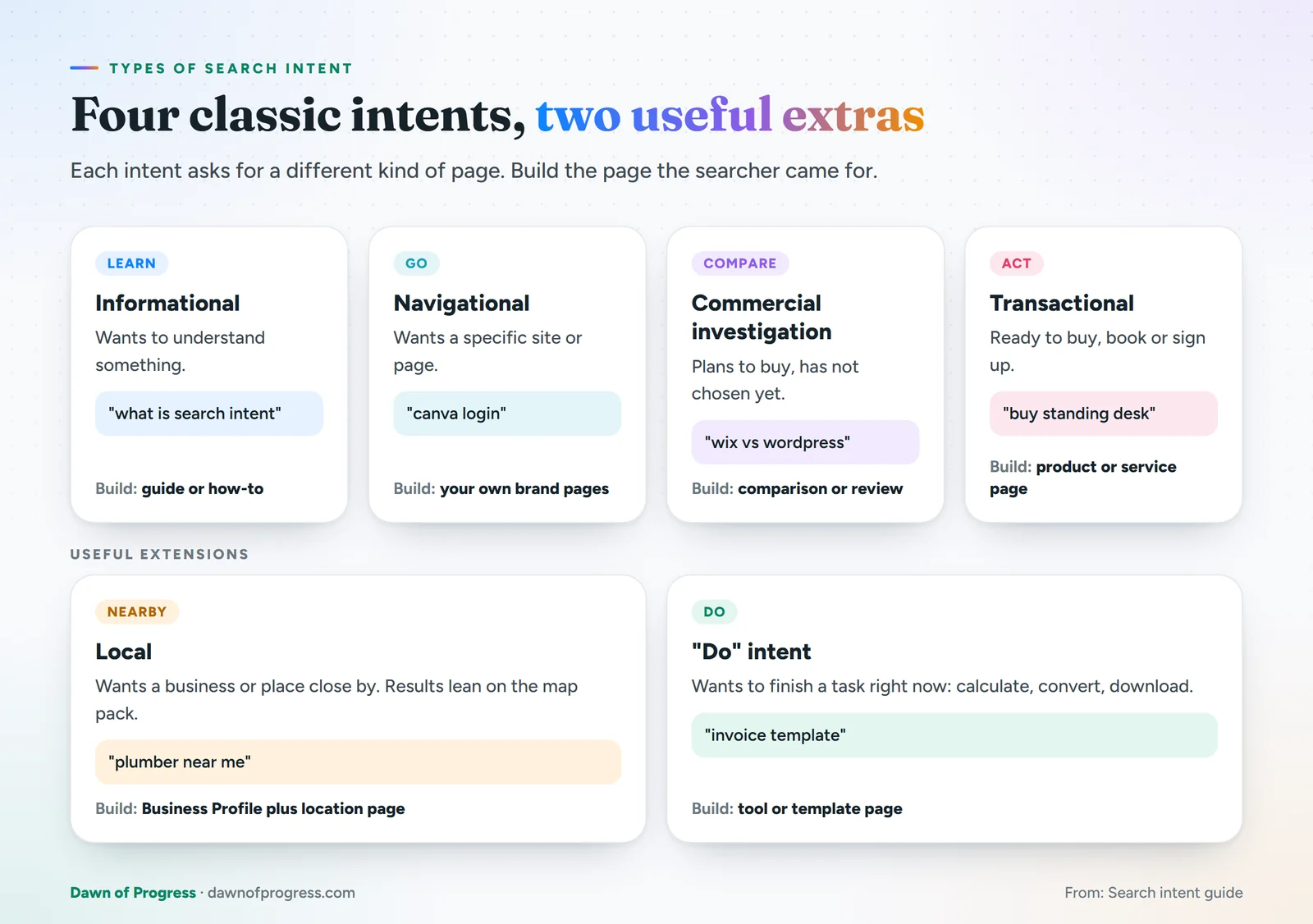
| Intent type | What the searcher wants | Typical words | Example queries | What usually ranks |
|---|---|---|---|---|
| Informational | To learn or understand | how, what, why, guide, ideas, examples | “what is search intent”, “how to repot a plant” | Guides, tutorials, definitions, videos |
| Navigational | To reach a specific site or page | brand or product names, “login” | “gmail login”, “canva”, “ikea opening hours” | The official site or page |
| Commercial investigation | To compare before deciding | best, top, vs, review, alternatives, price | “best accounting software for freelancers”, “wix vs wordpress” | Comparisons, reviews, “best” lists |
| Transactional | To buy, book, sign up or download | buy, order, price, deal, coupon, hire | “buy standing desk”, “book dentist appointment” | Product, category, service and pricing pages |
| Local (extension) | A business or place nearby | near me, city names, open now | “plumber near me”, “bakery in Lahore” | Map pack, Google Business Profiles, local service pages |
| “Do” (extension) | To complete a task right now | calculator, converter, template, generator | “mortgage calculator”, “invoice template” | Tools, templates, interactive pages |
Informational intent
The searcher wants knowledge, not a product. These are the biggest group of searches and the starting point of most buying journeys. Build guides, how-tos and explainers, and answer the question in the first paragraph.
Navigational intent
The searcher already knows where they want to go. You can only realistically win navigational searches for your own brand, so make sure your homepage, login page and contact page are easy to find and correctly titled.
Commercial investigation intent
The searcher plans to buy but has not chosen. They want honest comparisons, pros and cons, prices and who each option suits. A sales page rarely ranks here; a fair comparison does.
Transactional intent
The searcher is ready to act. They want a page where they can buy, book or contact you with no friction: price, options, trust signals and a clear button.
Local intent
Google treats many searches as local even without “near me”. The Rater Guidelines call this Visit-in-Person intent. Results lean on the map pack and business profiles, so a strong Google Business Profile matters as much as your website.
“Do” intent
The Rater Guidelines use “Do” for queries where the person wants to accomplish something, such as download, convert or calculate. If the top results are all tools, a 2,000-word article will struggle; a simple working tool or template wins.
How do you identify search intent by reading the SERP?
The SERP (search engine results page) is Google’s current answer to “what does this searcher want?”. Reading it takes five minutes per keyword and beats any intent label in a tool, because the tool is guessing and the SERP is what actually ranks.
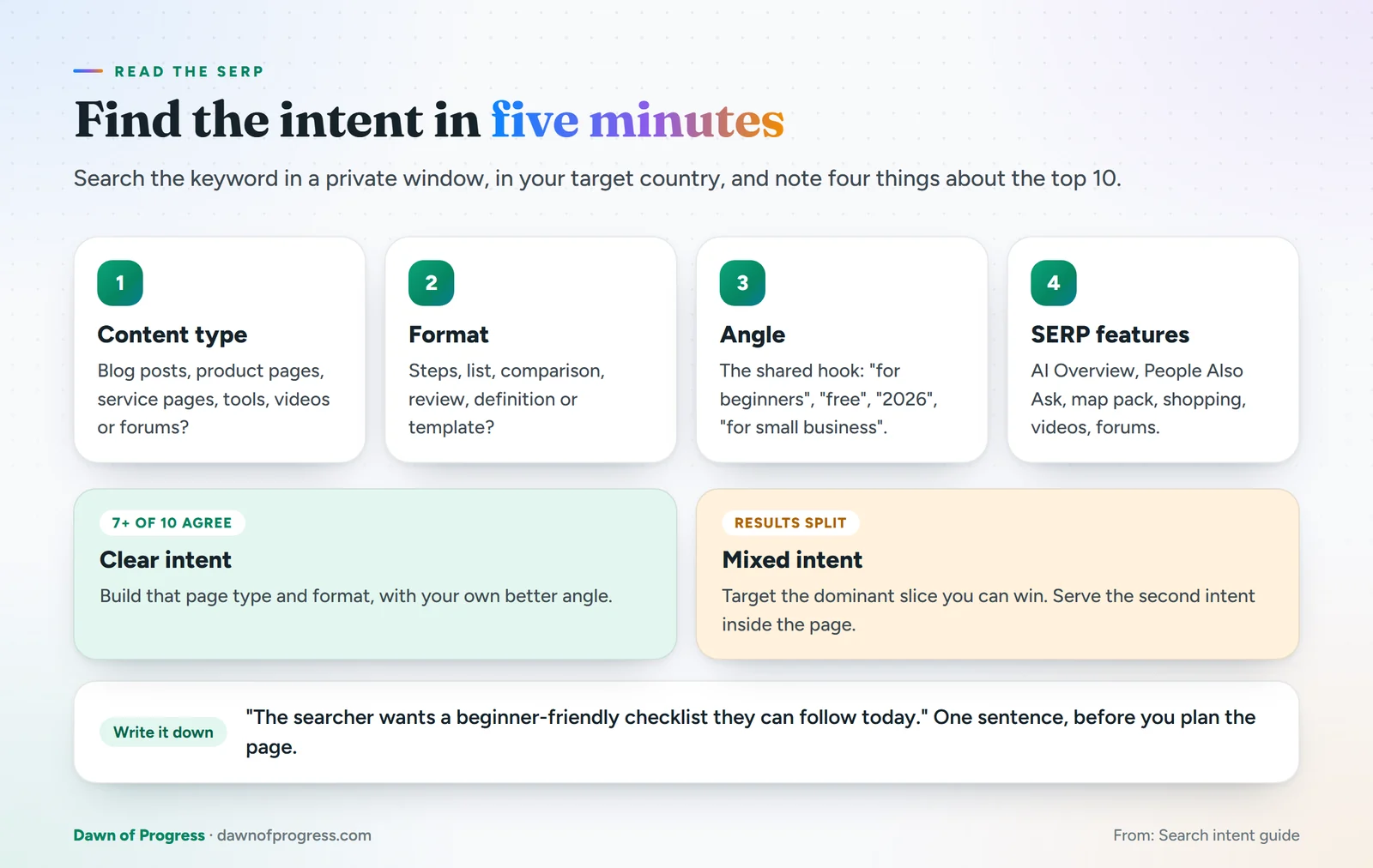
- Search in a clean window. Use a private or incognito window, set to the country you target. Your own history can change what you see.
- Note the content type of the top 10: blog posts, product pages, category pages, service pages, tools, videos or forums.
- Note the content format: step-by-step guide, list (“15 ideas”), comparison, review, definition, template or calculator.
- Note the angle: the hook most results share, such as “for beginners”, “2026”, “free”, “in 10 minutes” or “for small business”.
- Note the SERP features: AI Overview, featured snippet, People Also Ask, map pack, shopping results, video carousel, images, Discussions and forums. Each one is a clue (see the table below).
- Count the pattern. If 7 or more of the top 10 share a type and format, the intent is clear. If they split, read the section on mixed intent.
- Write the intent in one sentence before you plan the page: “The searcher wants a beginner-friendly checklist they can follow today.”
What do SERP features tell you about intent?
| SERP feature | What it suggests |
|---|---|
| AI Overview or featured snippet | Informational; a short, direct answer is expected |
| People Also Ask | Informational; shows the follow-up questions to cover |
| Map pack | Local intent; your Business Profile competes here |
| Shopping ads or product listings | Transactional or commercial |
| Video carousel | People want to watch the steps |
| Image pack | A visual need (ideas, designs, diagrams) |
| Discussions and forums | People want real experiences and opinions |
| Sitelinks for one brand at the top | Navigational |
A SERP-reading worksheet you can copy
Fill one row per keyword. I use a simple spreadsheet with these columns, and it takes about five minutes a keyword.
| Keyword | Dominant content type | Format | Shared angle | SERP features | Intent (one sentence) | Page to build |
|---|---|---|---|---|---|---|
| search intent | Blog guides | Definition plus types and examples | “types”, “examples” | AI Overview, People Also Ask | Learn what it is and the main types, with examples | Long guide |
| best crm for small business | Comparison articles | Ranked list with prices | “2026”, “free plans” | People Also Ask, Discussions and forums | Compare options and prices before choosing | Comparison page |
| wedding photographer Lahore | Local business sites, directories | Service pages, portfolios | Packages, portfolio | Map pack | Find and contact a local photographer | Local service page plus Business Profile |
| invoice template | Template and tool pages | Downloadable file or editor | “free”, “word”, “pdf” | Images | Get a template right now | Template page |
The worksheet also feeds your keyword research: every keyword that needs the same page type and angle as another can share a page, and every one that doesn’t needs its own.
What is mixed or fractured intent?
Mixed intent (also called fractured intent) means one query has several common meanings or goals, and Google shows a blend of results to cover them. The Rater Guidelines describe this as queries with a dominant interpretation, common interpretations and minor ones.
There are two kinds:
- Different meanings. “Jaguar” can be the animal or the car brand. You can’t change that; pick the meaning your business serves and accept you’ll compete for part of the results.
- Different stages of the same topic. “Standing desk” shows product pages, buying guides and reviews together. Some searchers are ready to buy, others are still comparing.
How to handle mixed intent:
- Find the dominant slice. Count which page type holds the most top-10 spots, and especially the top 3.
- Build for the slice you can win. A small shop rarely beats big retailers for product listings but can win the buying-guide slot.
- Serve the second intent inside the page. A buying guide can link to products; a product category page can carry a short “how to choose” section.
- Don’t merge two clear intents into one page. If “logo design” brings back services and “logo design ideas” brings back image galleries, they need separate pages.
Does search intent change over time and by location?
Yes. Intent is not a fixed property of a keyword; it is how most people use that keyword right now, in that place.
Over time. News, launches and seasons shift intent. “Black Friday” turns from informational (“when is Black Friday”) to transactional (“deals”) as the date gets closer. A software name shows the official site most of the year and news articles after an outage. Google’s ranking systems guide describes “query deserves freshness” systems that show fresher content where people expect it, which is why year-stamped guides often rank for topics that change.
By location. “Football” means soccer in the UK and Pakistan and American football in the US. “Biryani” shows recipes in one place and restaurants with a map pack in another. Always check the SERP in the country you target. For local businesses, check from your actual service area too.
By device. Mobile results lean more towards maps, calls and quick answers for many local searches.
A simple habit: recheck your 10 to 20 most valuable keywords every three to six months. In my client work since 2014, the most common reason a page “suddenly” slipped was not a penalty or a technical fault; the results had shifted to a different page type and the page hadn’t followed.
How do you match search intent with the right page type and format?
Once you know the intent, choose the page type first, then the format, then the angle. Here are worked examples.
| Keyword | Intent | Best page type | Format and angle |
|---|---|---|---|
| how to clean a cast iron pan | Informational (how-to) | Blog guide | Numbered steps, short video, “without ruining it” |
| what is a meta description | Informational (definition) | Glossary or guide | Answer first, example, length guidance |
| best email marketing software | Commercial investigation | Comparison or “best” list | Ranked table with prices, who each suits |
| mailchimp vs brevo | Commercial investigation | Head-to-head comparison | Side-by-side table, verdict by use case |
| buy noise cancelling headphones | Transactional | Category page | Filters, prices, reviews, delivery info |
| hire wordpress developer | Transactional (service) | Service page | Process, prices or ranges, proof, contact form |
| dentist near me | Local | Business Profile plus location page | Hours, map, reviews, booking button |
| bmi calculator | Do | Tool page | Working calculator first, short explanation below |
| canva login | Navigational | Official login page | Not a target for anyone except the brand |
Then match the details the SERP shows:
- Depth: if the top results are 600-word answers, a 5,000-word guide may bury the answer. If they are deep guides, a thin page won’t compete.
- Freshness: if most titles carry the year, keep yours current and update the “Last updated” date only when you actually update the content.
- Media: if a video carousel or image pack appears, add a short video or clear images.
- Snippet text: write a title and meta description that promise the intent you match, such as “prices”, “step by step” or “for beginners”.
How do you fix a page that ranks poorly because of intent mismatch?
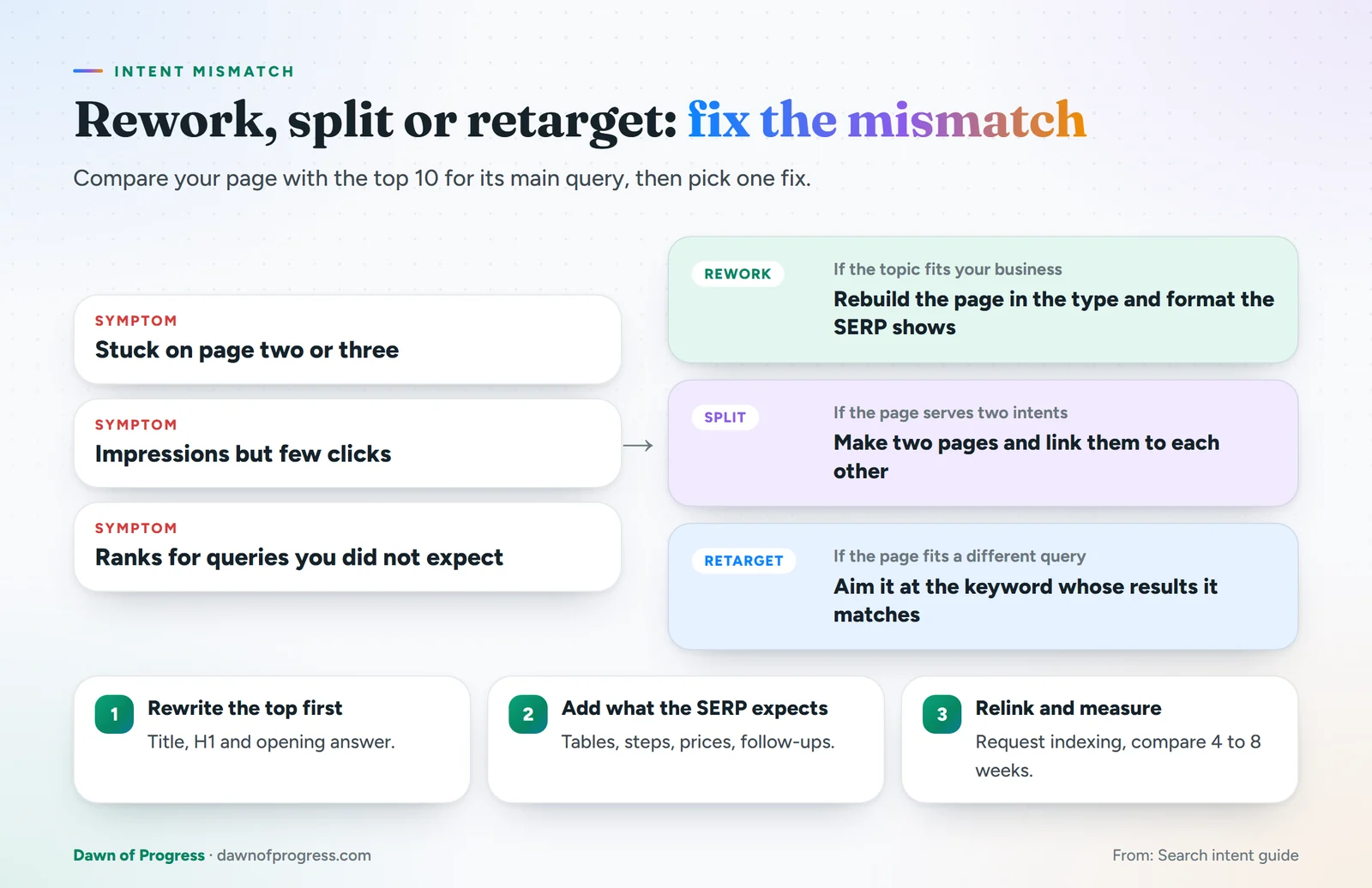
Intent mismatch means your page answers a different goal from the one the searcher has. The usual symptoms in Google Search Console: the page sits stuck on page two or three for its main keyword, it gets impressions but a low click-through rate, or it ranks for queries you didn’t expect.
Step by step
- List the page’s top queries. In Search Console, open Performance, filter by the page, and read the Queries tab.
- Search the main query in a clean window and fill in a worksheet row.
- Compare page type and format. Is yours a sales page where the top 10 are guides, or a blog post where the top 10 are product pages?
- Decide: rework, split or retarget. Rework the page if the topic fits your business. Split it if it is trying to serve two intents. Retarget it to a different keyword if the intent you serve is real but belongs to another query.
- Rewrite the top of the page first. Title, H1, opening answer and the first screen matter most.
- Add what the SERP expects: the missing comparison table, the steps, the prices, the follow-up questions from People Also Ask.
- Update internal links so other pages point to it with anchor text that matches the new intent (internal linking guide).
- Request indexing in Search Console and wait. Compare the next four to eight weeks with the previous period. Rankings move gradually.
Before and after example
Here is an illustrative example (not a real client) of a typical mismatch for a web design studio.
| Before | After | |
|---|---|---|
| Target keyword | “how much does a website cost” | Same |
| What the SERP shows | Guides with price ranges, cost breakdown tables, comparisons of DIY vs agency | Same |
| Page type | Service sales page: “Get a stunning website. Contact us for a quote.” | Cost guide with a link to the service page |
| Opening | Agency history and a contact form | A direct answer with typical price ranges by website type, marked as estimates |
| Body | Features and testimonials | Cost table by site type, what changes the price, DIY vs freelancer vs agency, hidden costs, questions to ask |
| Call to action | Big “Get a quote” at the top | Soft link to the studio’s packages near the end |
| Title tag | “Web Design Services, Affordable and Professional” | “How Much Does a Website Cost in 2026? Price Ranges Explained” |
The before page wasn’t bad; it was built for “web design services” (transactional), while the keyword was informational. The fix kept the sales page for its own transactional keyword and created a guide for the cost question, then linked the two.
How does search intent work in AI search?
AI search makes intent matching more important, not less. Google’s AI features documentation says AI Overviews and AI Mode may use a query fan-out technique, “issuing multiple related searches across subtopics and data sources” to build one answer. One question becomes many smaller searches, each with its own intent.
Three things change in practice:
- Conversations replace single queries. In AI Mode, ChatGPT or Perplexity, people ask follow-up questions in the same thread. The intent builds over several turns: “best CRM for a small agency”, then “which one has a free plan”, then “how hard is it to move from spreadsheets”.
- Passages compete, not just pages. The fan-out searches pull the best answer to each sub-question. A section that answers one follow-up clearly can be cited even if the page as a whole isn’t the top result.
- Simple informational intent is often answered on the page. Quick facts and definitions are increasingly settled in AI Overviews, so the click goes to pages that offer more: depth, tools, data, experience. More on that in zero-click searches.
How to match intent for AI search:
- Answer the main question in the first sentences under each heading.
- Cover the likely follow-ups as their own H2s or H3s: price, comparison, who it suits, how long it takes, mistakes.
- Use People Also Ask, related searches and your own customers’ questions to predict the fan-out.
- Keep facts specific and current so they’re safe to quote.
There is no separate “AI intent” to optimize for. Google says its AI features need no special optimization beyond normal SEO, and the same pages that satisfy searchers tend to be the ones AI tools cite. See LLM SEO for the wider picture.
What are the most common search intent mistakes?
- Trusting the tool label over the SERP. Keyword tools assign intent automatically and often label mixed queries with one type. Always check the live results.
- Turning every keyword into a blog post. Transactional and local keywords need service, product and location pages, not articles.
- Forcing a sales pitch onto informational pages. Readers who came to learn leave when the top of the page is a quote form.
- Covering two intents on one page. You end up ranking well for neither. Split them and link the pages.
- Ignoring format. Matching the topic but not the format (an essay where the SERP shows checklists or tools) still counts as a mismatch.
- Checking intent once. Results change with seasons, news and AI features. Recheck your key terms every few months.
- Checking from the wrong place. Results in your country or city can differ from your client’s market.
- Chasing traffic with no business value. A page can match intent perfectly and still bring visitors who will never buy. Pick intents that lead somewhere useful for your business.
Frequently asked questions
What are the 4 types of search intent?
Informational (learn something), navigational (reach a specific site), commercial investigation (compare before buying) and transactional (buy, book or sign up). Many SEOs also treat local and “do” intent as separate types.
What is an example of search intent?
“How to tie a tie” is informational: the person wants steps or a video. “Buy silk tie” is transactional: they want product pages with prices. Same topic, different intent, different page.
What is the difference between search intent and keyword intent?
They mean the same goal behind a search. “Keyword intent” is mostly used for the label an SEO tool attaches to a keyword, while “search intent” or “user intent” describes the searcher’s actual need.
How do you determine search intent?
Search the keyword in a private window in your target country, then note the page types, formats, angles and SERP features in the top 10. The pattern most results share is the intent Google has settled on.
Is search intent a ranking factor?
Not as a single measurable factor. But Google’s systems aim to show results that meet the searcher’s need, so a page that doesn’t match intent rarely ranks well whatever else it does right.
Can one page target multiple search intents?
A page can serve a main intent and a smaller related one, such as a buying guide with links to products. When two keywords bring back completely different results, build two pages.
How often should I check search intent?
Check before creating or rewriting a page, then every three to six months for your most valuable keywords, and straight away when a page drops for no technical reason.
Do AI tools change search intent?
They change how intent is expressed. People ask longer questions and follow-ups, and AI search breaks them into many smaller searches. Clear answers to the main question and its follow-ups help you get cited.

