
Last updated: November 2026. Written by Syed Usman Riaz.
Internal links are links from one page on your website to another page on the same website. They help Google find your pages, understand what each page is about through the link text, and see which pages you consider most important. Google’s own rule is simple: every page you care about should have a link from at least one other page on your site, and there is no ideal number of links per page. A good internal linking strategy means linking related pages to each other in the body text, with descriptive anchor text, so your strongest pages pass attention to the pages you want to rank.
This guide covers the types of internal links, why they matter, how to plan them with topic clusters, how to write anchor text, and a step-by-step process you can run on an existing site this week. It ends with a worked example, common mistakes and FAQs.
Key takeaways
- Every important page needs at least one internal link from another page. Pages with none (orphan pages) are hard for Google and readers to find.
- Use real HTML links. Google reliably follows
<a href="...">links, not buttons or scripts without anhref. - Anchor text tells Google what the target page is about. Write descriptive, short link text. Skip “click here” and “read more”.
- Contextual links in the body do the most work. Link related posts to each other and back to a main hub page.
- There is no magic number of links. Add a link when it helps the reader, and stop when it starts to feel crowded.
- Start with pages that are close to page one. Search Console shows you which ones; link to them from your strongest related pages.
What are internal links?
An internal link is any hyperlink that points from one page of a website to another page on the same domain. A link from example.com/blog/ to example.com/blog/bread-recipe/ is internal. A link from your site to wikipedia.org is external, and a link from another site to yours is a backlink (the subject of my link building guide).
Internal links are part of on-page SEO, the work you do on your own pages, and they are one of the few ranking factors you control completely. You don’t need anyone’s permission or budget to add one.
What are the main types of internal links?
Most sites use four kinds. They all count, but they do different jobs.
| Type | Where it appears | Main job | Example |
|---|---|---|---|
| Navigation (navigational) links | Main menu, header, sidebar | Help people and crawlers reach top-level sections | “Services”, “Blog”, “Contact” in the menu |
| Contextual links | Inside the body text of a post or page | Connect related topics and pass meaning through anchor text | “…start with keyword research before you write” |
| Footer links | Site footer, on every page | Reach utility pages: privacy, contact, about | “Privacy policy”, “Careers” |
| Breadcrumbs | A trail near the top of the page | Show where a page sits in the site structure | Home > Blog > On-Page SEO > Internal linking |
Themes also add related posts blocks and category or tag archives automatically. Contextual links are the ones you choose by hand, and they carry the most meaning, so most of this guide is about them.
Why are internal links important for SEO?
Internal links do four jobs at once: they help search engines discover pages, explain what those pages are about, signal which pages matter most, and guide readers to the next useful step.
1. Discovery and crawling
Google finds most new pages by following links from pages it already knows. Its documentation says that “every page you care about should have a link from at least one other page on your site” (Google Search Central: link best practices). A sitemap helps too, but a page that appears only in the sitemap and nowhere in your site’s links looks unimportant. I cover sitemaps and crawling in the technical SEO checklist.
The link also has to be crawlable. Google says it generally crawls a link only when it is an <a> element with an href attribute that resolves to a real URL:
<!-- Crawlable -->
<a href="/blog/sourdough-starter/">how to make a sourdough starter</a>

<!-- Not reliably crawlable -->
<span onclick="goTo('/blog/sourdough-starter/')">Starter guide</span>
<a href="javascript:goTo('starter')">Starter guide</a>
If your site uses a JavaScript framework, check that buttons and cards that act like links are real <a href> links in the rendered HTML.
2. Context through anchor text
Anchor text is the visible, clickable text of a link. Google uses it to understand the page being linked to. A link that says “sourdough starter guide” tells Google far more than one that says “click here”. Google describes good anchor text as descriptive, reasonably concise and relevant to both the page it is on and the page it points to.
3. Importance
Pages that receive many internal links, especially from strong pages such as your homepage or a popular guide, look more important within your site. Links pass some of the value (often called link equity, an SEO-industry term rather than a Google one) that a page has earned from backlinks. If your best-linked blog post never links to your service page, that value stays where it is.
4. User journeys
A reader who finishes one article and finds a clear link to the next step stays longer and is more likely to enquire or buy. Good internal links answer “what should I read or do next?” before the reader has to ask.
How do topic clusters and hub-and-spoke linking work?
A topic cluster (also called hub and spoke) is a group of pages on one subject: a broad hub page (pillar) that covers the whole topic, and several spoke pages that each go deep on one sub-topic. Every spoke links to the hub, the hub links to every spoke, and spokes link to each other where it is natural.
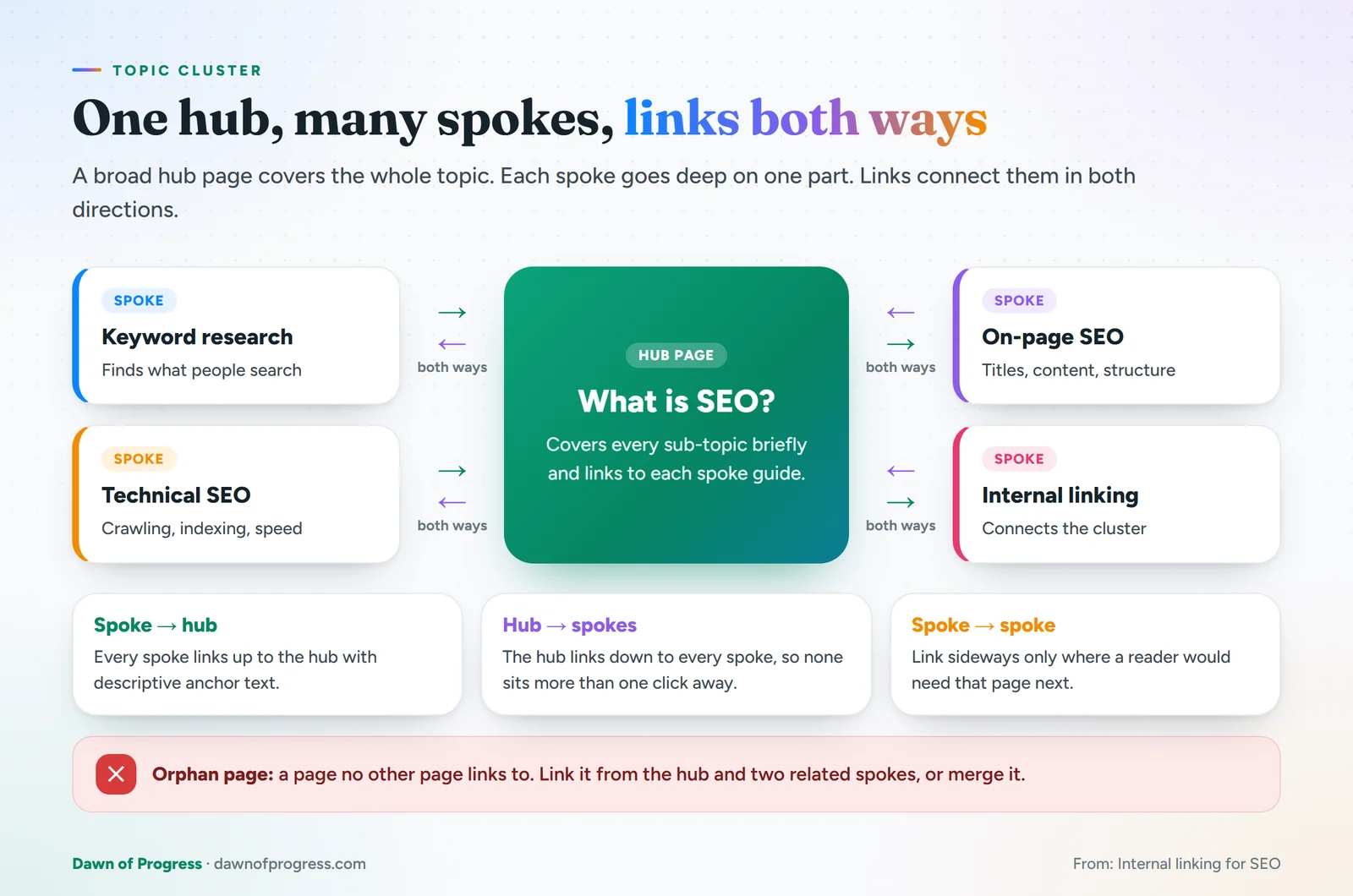
Here is how this site’s SEO guides are arranged:
- Hub: What is SEO? covers every part of SEO briefly.
- Spokes: guides on keyword research, on-page SEO, technical SEO, link building, internal linking (this page) and more.
- Links: each spoke links back to the hub, the hub links to each spoke, and this page links sideways to the on-page and technical guides because readers often need them next.
Why this works: the hub collects links from every spoke, so it becomes the strongest page for the broad term, and Google sees a clear group of pages covering one topic in depth.
You don’t need special software for this. A spreadsheet with three columns (hub, spoke, linked yes or no) is enough for most small sites.
What is click depth, and how deep is too deep?
Click depth is the number of clicks it takes to reach a page from the homepage. The homepage is depth 0, a page linked from the menu is depth 1, and a blog post reached through the blog page and then page 6 of the archive might be depth 7.
Pages buried deep tend to be crawled less often and receive fewer internal links. A common rule of thumb among SEOs is to keep important pages within about three clicks of the homepage. That is a guideline from practice, not a Google rule, so treat it as a target for your key pages rather than a limit for every URL.
Ways to reduce click depth:
- Link key pages from the homepage or main menu.
- Link from hub pages to every spoke.
- Add contextual links from popular posts to newer ones.
- Use category pages and breadcrumbs so older posts aren’t only reachable through long paginated archives.
What are orphan pages, and why do they hurt?
An orphan page is a page that no other page on your site links to. Search engines may still find it through a sitemap or an old backlink, but readers almost never will, and the lack of links suggests the page doesn’t matter.
Orphan pages are common after:
- A redesign that dropped old menu items.
- Landing pages built for ads and never linked from the site.
- Blog posts that were published, shared once and never linked again.
- Deleted category or tag pages that used to list older posts.
To fix an orphan page, decide first whether it deserves to exist. If it is useful, link to it from two or three related pages. If it is outdated or duplicates another page, update it, merge it into the better page with a 301 redirect, or remove it. The SEO audit guide explains how to make these keep, merge or remove decisions across a whole site.
How many internal links should a page have?
There is no fixed number. Google says: “There’s no magical ideal number of links a given page should contain. However, if you think it’s too much, then it probably is” (Google Search Central).
You will see rules like “one link every 300 words” or “5 to 10 links per 2,000 words” in SEO articles. Those are personal suggestions, not Google guidance. A better test:
- Does each link help a reader who is reading that sentence?
- Is the target page genuinely related?
- Could a reader still follow the paragraph comfortably, or is every other phrase blue?
As a rough working habit (my estimate, not a rule), a 2,000 to 3,000 word guide on this site usually ends up with 5 to 10 contextual links because that is how many genuinely related pages fit. A short news post might have two. A hub page might have thirty, because linking out is its job.
How should you write anchor text?
Write anchor text that describes the target page in a few words, reads naturally in the sentence, and makes sense if someone reads only the link. Google’s tip is exactly that: read the anchor text on its own and check that it still makes sense.
Good vs bad anchor text examples
| Bad anchor text | Why it fails | Better anchor text |
|---|---|---|
| Click here | Says nothing about the target page | our guide to choosing a sourdough flour |
| Read more | Generic; the same text repeated on every card | read the full sourdough starter guide |
| this article | Vague; the reader can’t predict where it goes | how to store a sourdough starter |
| best cheap SEO services London SEO agency | Keyword stuffed; reads like spam | our SEO services for small businesses |
| here is a really detailed step-by-step guide to fixing every kind of slow website problem | Far too long; the key phrase is lost | how to speed up a slow website |
| SEO | Too broad if the page is about one narrow task | how to write a meta description |
Anchor text rules I follow
- Describe the destination, not the action. “Meta description guide” beats “learn more”.
- Keep it short. Usually 2 to 6 words.
- Vary it naturally. Linking to the same page with exactly the same keyword phrase from fifty pages looks engineered. Use natural variations: “keyword research”, “how to find keywords”, “keyword research guide”.
- Don’t use the same anchor for two different pages. If “SEO checklist” points to two URLs, Google and readers can’t tell which one is the real checklist.
- Give links some space. Google advises against chaining links right next to each other; each link should have surrounding text that explains it.
- Image links need alt text. When an image is the link, Google uses the image’s alt text as the anchor. Write it like anchor text.
Keep internal links followed. Adding rel="nofollow" to your own links doesn’t save “link value” for other pages; it only tells Google not to rely on that link. Leave nofollow for paid, untrusted or user-generated links.
How do you add internal links to an existing site, step by step?
This process works for a 20-page site or a 2,000-page site. It focuses your time on pages that can move, instead of linking everything to everything.
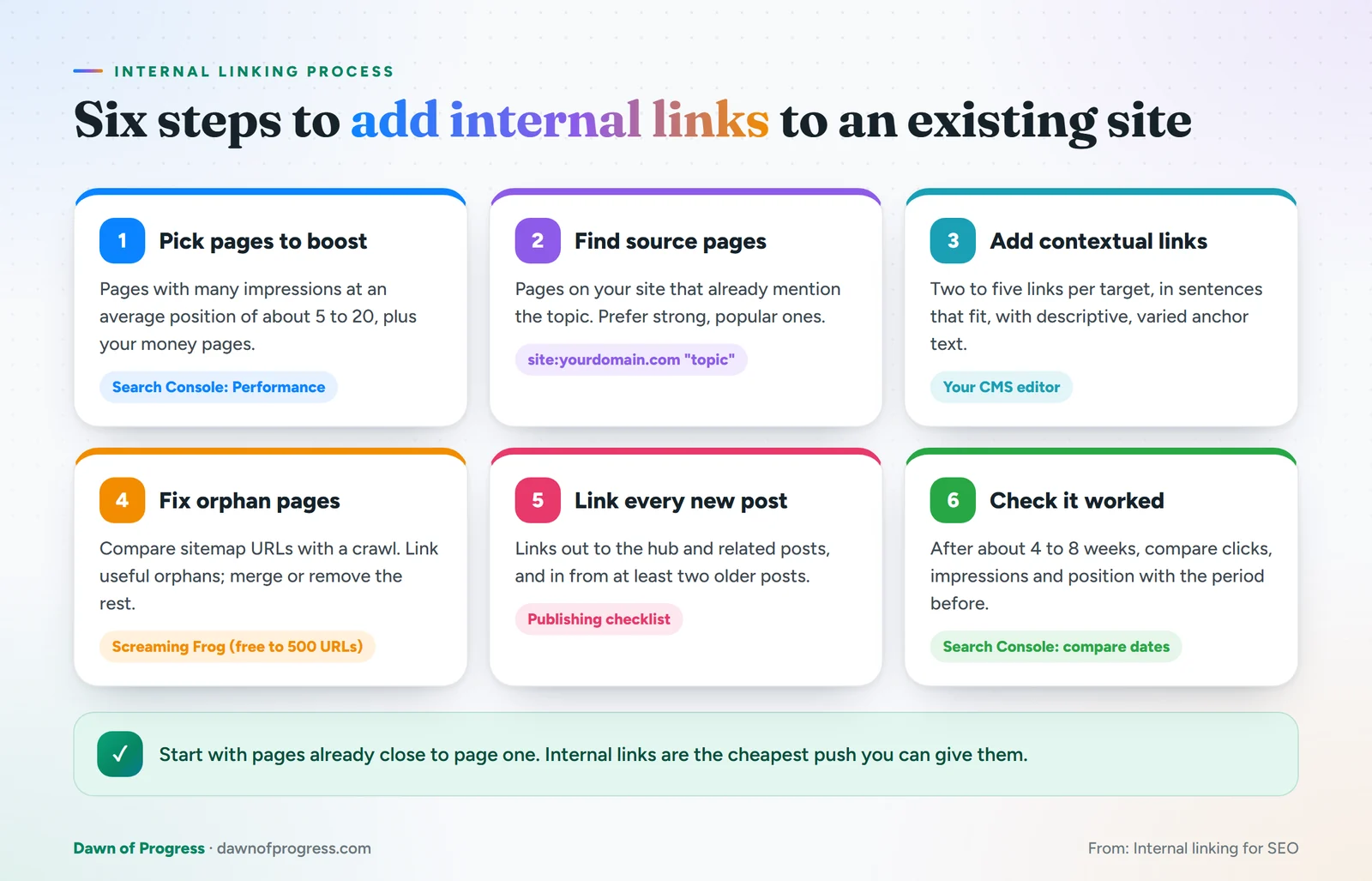
Step 1: Find the pages you want to boost in Search Console
- Open Google Search Console and go to Performance > Search results.
- Turn on Average position, open the Pages tab and sort by impressions.
- Note pages with plenty of impressions and an average position of roughly 5 to 20. These are close to the first page, and internal links are a cheap way to give them a push.
- Add your money pages (services, products, contact) even if they rank poorly. They should be linked from relevant posts regardless.
Write down the main query for each target page (from the Queries tab after you click the page). That query becomes your anchor text idea.
Step 2: Find relevant source pages with a site: search
For each target page, search Google for:
site:yourdomain.com "sourdough starter"Replace the phrase with your target page’s main topic. Google returns pages on your site that mention it. These are your source pages: they already talk about the topic, so a link will read naturally. You can also search your CMS for the phrase, or use a crawler to search page text.
Prioritise source pages that are themselves strong: high traffic, many backlinks (check the Links report), or close to the homepage.
Step 3: Add contextual links
Open each source page and add one link to the target page:
- Link from a sentence that already mentions the topic. If none fits, write one helpful sentence; don’t force a phrase.
- Use descriptive anchor text based on the target query, varied slightly between sources.
- Put the link where it helps, ideally early in the body if it is a natural next step.
- Add two to five new links per target page, then stop and measure.
Step 4: Fix orphan pages
- Get a list of every URL that should exist: your XML sitemap is the easiest source.
- Crawl your site from the homepage with a crawler such as Screaming Frog (free up to 500 URLs).
- Compare the two lists in a spreadsheet. Any sitemap URL the crawler didn’t find through links is an orphan (or blocked from crawling).
- Link useful orphans from two or three related pages, and merge or remove the rest.
Step 5: Link new content as you publish
Every new post needs links in both directions: out to the hub and related posts, and in from at least two older related posts. Make “add inbound links from older posts” part of your publishing checklist. This one habit prevents most orphan pages.
Step 6: Check it worked
Wait four to eight weeks (an estimate; crawling speed varies by site). Then compare the target pages’ clicks, impressions and average position in Search Console against the period before. Use the URL Inspection tool to see whether Google has recrawled the source pages you edited. Small sites usually see slower and smaller changes, so look at the trend across several pages rather than one.
A worked example: internal linking on a small baking blog
This is an illustrative example of how I would approach a small site, not a client case. The blog has 40 posts about home bread baking, a homepage and an “About” page. Search Console shows that the post “How to make a sourdough starter” has a lot of impressions and sits at an average position around 11.
What the audit finds:
- The starter post is linked only from the blog archive, page 4. Its click depth is 5.
- Nine other posts mention “starter” in the text but don’t link to it.
- Three posts, including “Sourdough troubleshooting”, have no internal links pointing to them at all.
- Every recipe card uses a “Read more” button as its only link text.
What changes:
| Change | Before | After |
|---|---|---|
| Hub page | None | New “Sourdough baking guide” hub, linked from the main menu |
| Links to the starter post | 1 (archive page) | Hub plus 5 contextual links from related recipes |
| Click depth of the starter post | 5 | 2 (Home > hub > starter post) |
| Orphan posts | 3 | 0, each linked from the hub and two related posts |
| Card link text | “Read more” | The post title, e.g. “Sourdough troubleshooting: 7 common problems” |
Example contextual link, before and after:
- Before: “Feed it twice a day. For more tips, click here.”
- After: “Feed it twice a day, and if it stops rising, read our guide on how to revive a sluggish sourdough starter.”
Apart from the hub, no new content was written; existing posts simply point at each other the way a reader would expect. A few weeks later, the owner compares the starter post’s position and clicks in Search Console with the previous period. No result is guaranteed, but this low-cost change is worth making before writing anything new.
How do internal links help in AI search?
Internal links matter for AI search for the same reasons they matter for classic search. Google’s guidance for its AI features, including AI Overviews and AI Mode, lists making content easy to find through internal links among its basic best practices and says no special optimization is needed beyond normal SEO (Google Search Central: AI features).
In practice that means:
- AI answers can only cite pages that were found and indexed. Orphan pages are less likely to be either.
- Clusters show depth. A hub with well-linked spokes makes it clearer that your site covers a topic thoroughly, which helps when AI tools run several related searches to build one answer.
- Descriptive anchors are clear labels. They make the relationship between pages explicit for any system reading your site.
- Readers who arrive from an AI citation land on one page. Good internal links give them the next step instead of a dead end.
I go further into this in LLM SEO and SEO vs GEO.
Which tools help with internal linking?
You can do everything in this guide with free tools. Paid tools mostly save time on large sites.
| Tool | Cost | What it does for internal links |
|---|---|---|
| Google Search Console, Links report | Free | Shows your most internally linked pages and which pages link to a given page. The data is a sample, not a complete list |
| Google Search Console, Performance report | Free | Finds pages ranking close to page one that are worth boosting |
site: search on Google | Free | Finds pages on your site that mention a topic, as link sources |
| Screaming Frog SEO Spider | Free up to 500 URLs per crawl; paid licence removes the limit | Crawls your site, shows each page’s crawl depth, inlinks and anchor text, and finds broken internal links |
| WordPress SEO plugins (Yoast SEO Premium, Rank Math) | Free and paid tiers | Suggest related posts to link to while you write |
| Link Whisper (WordPress) | Paid | Dedicated internal link suggestions and reports |
Search Console’s Links report sits in the left menu under Links; the Internal links section lists “Top linked pages”, and clicking a page shows which pages link to it (Search Console Help: Links report). Screaming Frog’s free version is limited to 500 URLs per crawl and doesn’t save crawls or open the configuration options (Screaming Frog pricing), which is plenty for most small business sites.
A word of caution on plugins: automatic link suggestions are a starting point. Read each suggestion and accept only those that fit the sentence. A plugin that inserts links automatically across hundreds of posts can create exactly the repetitive, keyword-heavy anchors this guide warns against. For more options, see my free SEO tools roundup.
What are the most common internal linking mistakes?
- Publishing and forgetting. New posts get links out to older posts but never get links in. This is the main cause of orphan pages.
- Generic anchor text. “Click here”, “read more” and “this post” waste the clearest signal you have.
- Exact-match anchors everywhere. Using the identical keyword phrase from every page looks unnatural. Vary it.
- Linking for the sake of it. A link to an unrelated page confuses readers and adds nothing for Google.
- Broken or redirected internal links. Links to deleted or moved pages send readers to a 404 or through a redirect. Point links straight to the final URL.
- Nofollow on internal links. It doesn’t help other pages and only weakens your own signals.
- Links Google can’t follow. Menus, buttons or cards built without a proper
<a href>. - Deep, unlinked archives. Older posts reachable only through page 9 of a blog archive.
- Competing pages with the same anchor. Two pages targeting one term, both linked with that term, split the signal. Merge them or give each a distinct focus.
In my client work since 2014, the most common pattern I’ve seen on small business sites is not bad linking but almost no linking: good blog posts that never point to the service pages that pay the bills.
Frequently asked questions
What are internal and external links?
Internal links point to another page on the same website. External links point to a page on a different website. Links from other sites to yours are called backlinks.
What are the different types of internal links?
The main types are navigation (menu) links, contextual links in the body text, footer links and breadcrumbs. Related-post blocks and category pages also create internal links automatically.
What type of internal links are best for SEO?
Contextual links in the main content, with descriptive anchor text, carry the most meaning because they connect related topics in context. Navigation links still matter for making key sections easy to reach.
Why is internal linking important for SEO?
It helps Google discover pages, understand them through anchor text and judge which ones matter most. It also keeps readers moving to the next useful page.
How many internal links per page is too many?
Google says there’s no ideal number, and if it feels like too many, it probably is. Link when it helps the reader.
Do internal links pass PageRank?
Yes, followed internal links pass signals between your pages, which is why links from your strongest pages to your priority pages help. Google doesn’t publish how much.
What are the best internal linking tools?
Google Search Console’s Links report and Screaming Frog’s free crawler cover most needs. On WordPress, Yoast SEO Premium, Rank Math or Link Whisper can suggest links as you write.
How often should I review internal links?
Add links every time you publish, and run a full check for broken links and orphan pages every three to six months, or after any redesign.


